Quick Commands
Quick Commands are a command operation method provided by CmdWise App, based on user-defined commands, offering one-click execution functionality.
Quick Commands VS Command Apps
| Comparison | Quick Commands | Command Apps |
|---|---|---|
| Definition | One-click command shortcuts Like desktop shortcuts, click to execute preset commands Suitable for simple high-frequency operations like restarting services, opening folders No complex configuration needed, set once and use anytime | Visual command operation tools Like mobile apps, providing graphical interface for command-line tools Suitable for complex operations like image processing, video conversion Beginner-friendly, no need to memorize command parameters |
| Operation Method | Click card, one-click execution | Fill forms, configure parameters then execute |
| Learning Curve | Low (requires basic command-line knowledge) | Extremely low (completely visual operation) |
| Usage Speed | Extremely fast (second-level execution) | Fast (need to fill parameters) |
| Flexibility | Low (fixed parameters) | High (adjustable parameters) |
| Error Probability | Low (preset commands) | Extremely low (parameter validation) |
Built-in Quick Commands List
| No. | Quick Command Name | Command Content | Notes |
|---|---|---|---|
| 1 | Open Downloads folder | open ~/Downloads | |
| 2 | Open user directory | open ~ | |
| 3 | Screenshot | screencapture -i -U -p | |
| 4 | Test network | ping www.apple.com | Opens terminal |
| 5 | Network speed test | networkquality -s | Opens terminal |
| 6 | Get public IP | curl ifconfig.me | Opens terminal |
| 7 | Get local IP (Wi-Fi) | ipconfig getifaddr en0 | Opens terminal |
| 8 | Clean brew cache | brew cleanup -s | |
| 9 | nginx reload | nginx -s reload | |
| 10 | mysql start | brew services start mysql | |
| 11 | Open AirDrop | open -a Finder /System/Library/CoreServices/Finder.app/Contents/Applications/AirDrop.app |
Create Custom One-Click Operations
Creation method:
- Click "Add Command" button
- Fill in command name and description
- Enter command to execute
- Select icon and category
- Set risk level
- Save to use
Demo Example: Open multi-level directory, click quick command to quickly enter directory
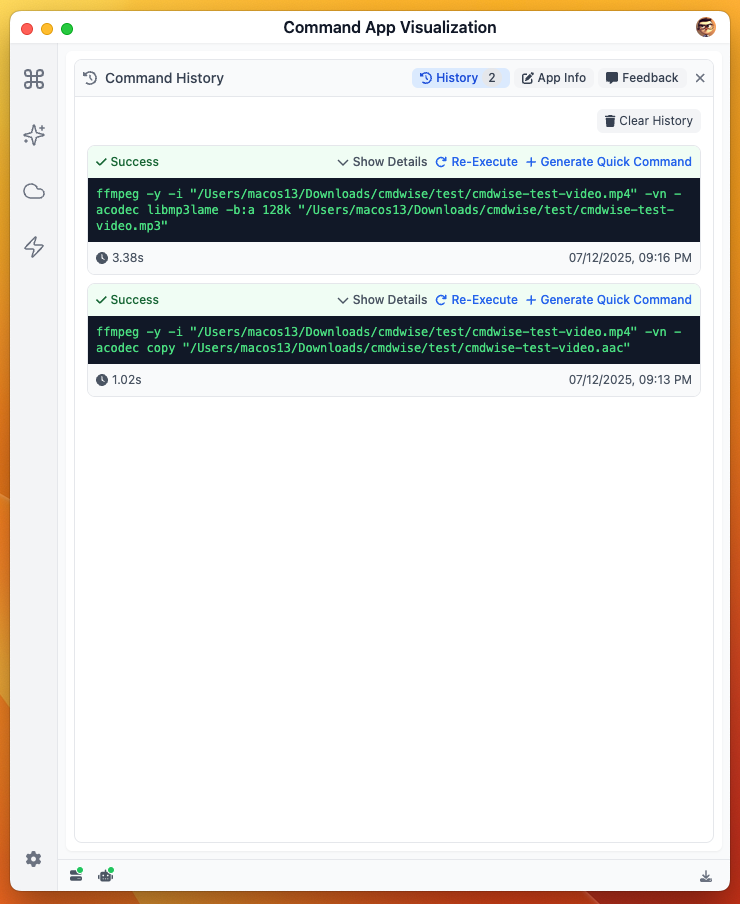
Generate Quick Command from Command App
Enter command app, open history records, click "Generate Quick Command" button to save and generate.
Modify Quick Commands
Provides quick copy functionality. For the same function with only different parameters, you can directly copy, modify parameters, then save and use.
Notes
- Quick commands can be executed with a click. For potentially risky ones, pay attention to confirm whether execution is needed. (You can edit in quick app, check "Confirmation required before execution", so it will pop up confirmation every time)