.DS_Store Cleaner: Say Goodbye to System "Junk"
Use the find command to quickly and safely batch search and clean up .DS_Store junk files automatically generated by macOS in various folders.
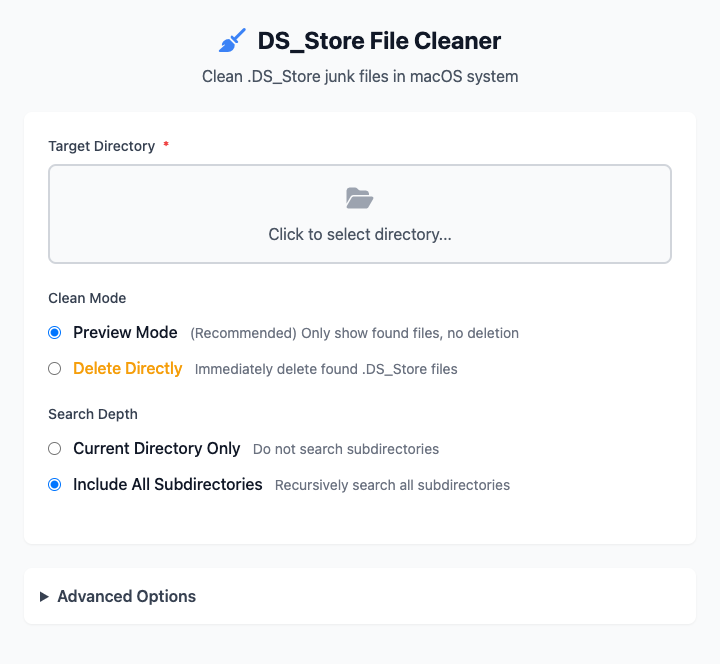
⚡️ Quick Start: Clean a Project Folder
- Click to select a target directory (e.g., your code project folder).
- Ensure "Clean Mode" is set to Preview Mode.
- Ensure "Search Depth" is set to Include All Subdirectories.
- Click the "Execute" button. After the command completes, you'll see a list of all
.DS_Storefiles in that directory. After confirming it's correct, switch to "Direct Delete" mode to generate the deletion command.
🤔 When Should I Use It?
- When you need to package a folder (especially code projects) into a
.zipfile to share with others, you want to remove all.DS_Storefiles before packaging to keep it clean. - You're using Git or other version control tools and don't want these system files to be accidentally committed to your code repository.
- You're simply obsessive about cleanliness and don't like these hidden system files scattered throughout your folders.
⚙️ Parameter Settings
Clean Mode
This is the most important safety setting of this tool:
- Preview Mode: (Strongly Recommended) Only searches and lists all found
.DS_Storefiles, no deletion operations will be performed. This is the safest way, allowing you to clearly see which files will be deleted before taking action. - Direct Delete: Directly deletes all found
.DS_Storefiles. Please use this mode cautiously only after previewing and confirming everything is correct.
Search Depth
- Current Directory Only: Only searches in the selected directory level, doesn't enter any subdirectories.
- Include All Subdirectories: (Commonly Used) Recursively enters every subdirectory under your selected directory for thorough searching and cleaning.
Advanced Options
- Show Detailed Output: When checked, the
findcommand prints detailed information about each file it searches and deletes, making it easy to understand what's happening behind the scenes.
⚠️ What is .DS_Store?
.DS_Store (Desktop Services Store) is a hidden file automatically generated by macOS Finder. It stores custom attributes for specific folders, such as window position, icon size, background color, etc. These files are harmless to macOS users themselves, but for developer collaboration, file sharing, or cross-platform use, they are useless "junk" and may expose some directory structure information.
Dependencies
This tool completely relies on the find command built into macOS, no additional dependencies need to be installed, ready to use out of the box.