Sox Audio Normalizer: Make All Audio Volume Consistent
This is a professional audio processing application that uses the powerful sox command to analyze and adjust audio file volumes. If you have a batch of recording files with inconsistent volume levels, this tool can make them sound equally loud while avoiding distortion.
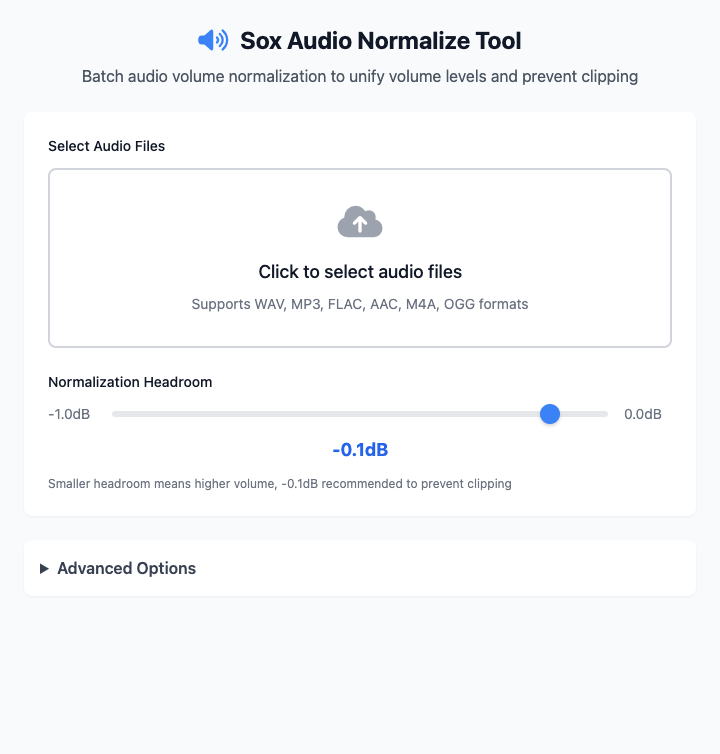
⚡️ Quick Start
- Select Audio Files: Click the file selection area and choose one or more audio files that need processing.
- Set Normalization Headroom: Keep the default
-0.1dB, which can maximize volume while effectively preventing clipping. - Click the "Execute" Button: After the command completes, you'll get normalized audio files.
🤔 When Should I Use It?
- You recorded a series of podcasts or videos, but each segment has inconsistent volume levels, making them uncomfortable to listen to.
- You collected some music files and want their overall loudness to remain at roughly the same level, avoiding frequent volume adjustments when switching songs in a playlist.
- You feel some audio is too quiet and want to safely boost its volume without causing distortion.
⚙️ Parameter Description
Select Audio Files: Add one or more audio files that need volume normalization. Supports various common formats including WAV, MP3, FLAC, AAC, M4A, OGG.
Normalization Headroom:
- Defines the distance between the peak of the normalized audio waveform and the maximum level (0dBFS).
- A small negative value (like
-0.1dB) is the recommended setting, which can maximize volume while reserving a tiny safety margin for potential peaks, thus avoiding digital clipping (i.e., "distortion"). - The smaller this value (closer to 0.0dB), the louder the volume.
Advanced Options:
- Output File Prefix: String added to the beginning of processed filenames, default is
norm_. - Parallel Processing: When checked, the tool will attempt to process multiple files simultaneously, significantly reducing total processing time when dealing with many files.
- Overwrite Existing Files: If files with the same prefix already exist in the output directory, checking this will directly overwrite them.
- Output File Prefix: String added to the beginning of processed filenames, default is
⚠️ Important Notes
- This command depends on
sox. You need to install it via Homebrew first:brew install sox. - Normalization processing generates new files, using the
norm_prefix by default, and saves them in the same directory as the original files. - This is a responsive interface, and all your settings will be reflected in real-time in the command area below.
Related Tools
In the CmdWise app market, you can also find other Sox series audio tools:
- Sox Audio Converter: Batch convert audio formats, for example from WAV to MP3.
- Sox Audio Trimmer: Precisely extract a portion from the middle of an audio segment.
- Sox Speed & Pitch Tool: Speed up speech without changing pitch, or raise pitch without changing speed.