Sox Speed & Pitch Tool: Master Audio Speed and Pitch
This is a powerful audio application that allows you to change audio playback speed without affecting its pitch (speed change without pitch change), or change pitch without affecting its speed (pitch change without speed change). This is very useful for creating "1.5x speed" podcasts, adjusting music keys, or fun voice effects.
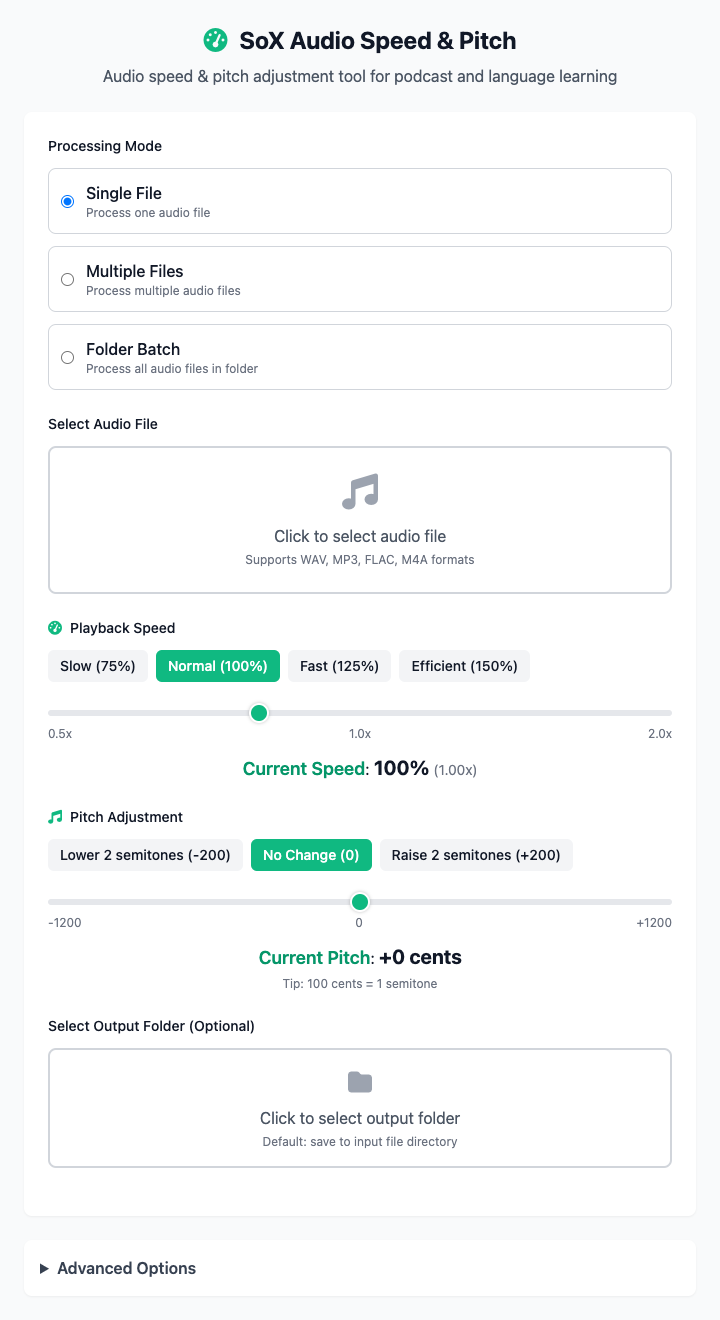
⚡️ Quick Start
- Select Audio: In "Single File Processing" mode, click to select a source audio file to process.
- Adjust Speed: Click the
125%speed preset button to accelerate the audio to 1.25x speed. - Choose Output Directory: Specify where the processed file should be saved.
- Click "Execute" Button: After the command completes, you'll get the processed audio file.
🤔 When Should I Use It?
- You're listening to an online course or podcast and feel the speech is too slow. You want to speed it up 1.2x without changing the speaker's pitch (avoiding cartoon-like sounds).
- You want to practice a song, but the original key is too high. You need to lower the backing music by two semitones (enter
-2or drag the slider to-200 cents). - You just want to have fun, making a friend's recording sound fast and squeaky, or slow and deep.
⚙️ Parameter Settings
Processing Mode: Defines the operation scope - single file, multiple files, or entire folder.
Select Audio Files/Directory: Add source files or folders to process.
Playback Speed: Controls audio playback rate. Greater than 1.0 speeds up, less than 1.0 slows down. Common presets include 75%, 100%, 125%, 150%.
Pitch: Adjusts sound pitch in "semitone" units. Range is ±12 semitones (one octave). Positive values raise pitch, negative values lower it.
Output Directory: All processed audio files will be saved in this folder.
Advanced Options:
- Output Format: Choose the save format for processed files (like MP3, WAV, FLAC), or keep original format.
⚠️ Important Notes
- This command depends on
sox. You need to install it first via Homebrew:brew install sox. - Processed files will be saved in the format
[original-filename]_[effect].[extension](e.g.,audio_speed_1.5x.mp3) in your specified output directory. - Significant speed or pitch changes may cause audio quality loss or subtle distortion, which is normal.
Related Tools
In the CmdWise app marketplace, you can also find other Sox series audio tools:
- Sox Audio Converter: Batch convert audio formats, such as from WAV to MP3.
- Sox Audio Normalizer: Keep multiple audio segments at consistent volume levels, avoiding highs and lows.
- Sox Audio Trimmer: Precisely extract a portion from the middle of an audio segment.