Sox Audio Trimmer: Precisely Extract Audio Segments
This is a powerful audio editing application based on the professional sox command. It helps you extract the needed portions from longer audio files with precise start times and durations, perfect for creating ringtones or editing podcasts.
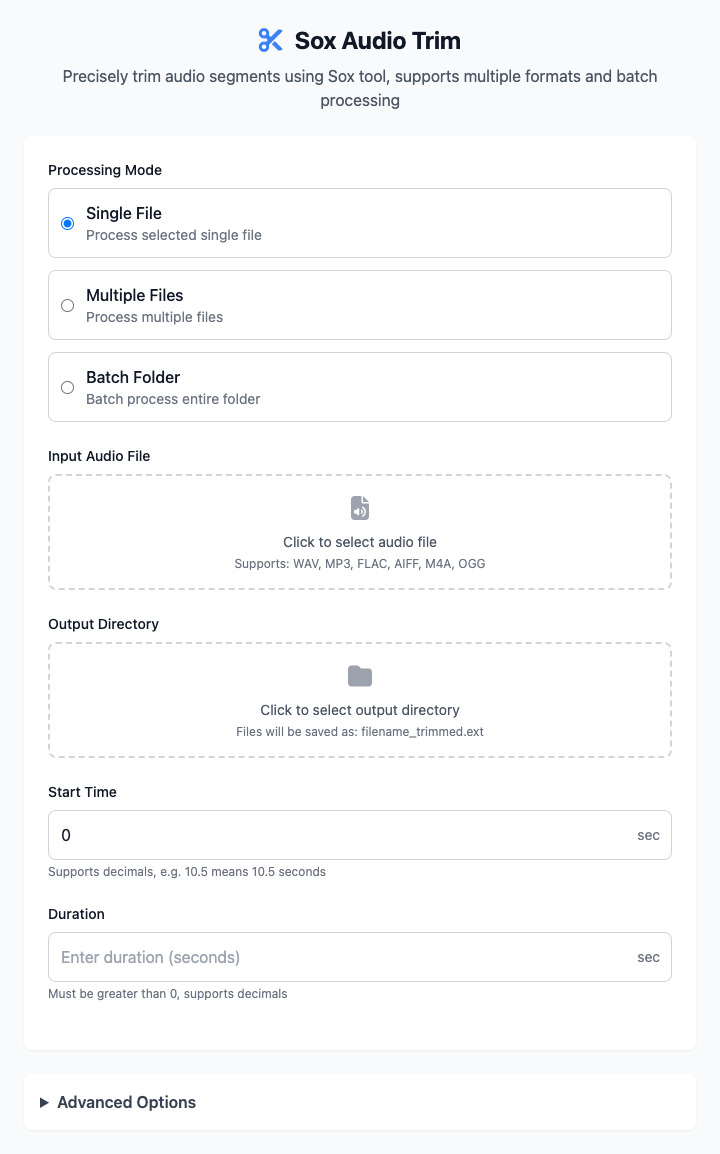
⚡️ Quick Start
- Select Audio File: In "Single File Processing" mode, click to select a source audio file to extract from.
- Choose Output Directory: Specify a folder to store the extracted audio segments.
- Set Time:
- Enter
30in "Start Time" (start from the 30th second). - Enter
15in "Duration" (extract a total of 15 seconds).
- Enter
- Click "Execute" Button: After the command completes, you'll get the extracted audio file.
🤔 When Should I Use It?
- You want to extract a segment from a song to use as a phone ringtone.
- A recording has excess silence or noise at the beginning or end that you need to trim off.
- You need to extract an exciting segment from a long speech for sharing.
⚙️ Parameter Settings
Processing Mode:
- Single File Processing: Process only one selected audio file.
- Multi-File Processing: Process multiple manually selected audio files.
- Folder Batch: Apply the same extraction rules to all audio files in a specified folder.
Input/Output:
- Input Audio File/Directory: Add source files or folders to process. Supports multiple formats including WAV, MP3, FLAC, AIFF, M4A, OGG, etc.
- Output Directory: All extracted audio segments will be saved in this folder.
Time Settings:
- Start Time: The starting time point for the segment extraction (in seconds), supports decimals.
- Duration: The length of time to extract from the start time point (in seconds), supports decimals.
Advanced Options:
- Output Format: Choose the save format for extracted files (like MP3, WAV, FLAC), or keep original format.
- Audio Quality: When output format is MP3, this sets the bitrate (like 128kbps, 192kbps, 320kbps), determining audio quality and file size.
⚠️ Important Notes
- This command depends on
sox. You need to install it first via Homebrew:brew install sox. - Extracted files will be saved in the format
[original-filename]_trimmed.[extension]in your specified output directory. - Please ensure the input "Start Time" and "Duration" are within the valid duration range of the original audio.
Related Tools
In the CmdWise app marketplace, you can also find other Sox series audio tools:
- Sox Audio Converter: Batch convert audio formats, such as from WAV to MP3.
- Sox Audio Normalizer: Keep multiple audio segments at consistent volume levels, avoiding highs and lows.
- Sox Speed & Pitch Tool: Speed up speech without changing pitch, or raise pitch without changing speed.