CmdWise logo CmdWise

Transform Command Line Tools into Visual Command Apps

CmdWise uses AI to transform complex CLI commands into visual Command Apps with zero coding.

Download Free → Learn More

Why Choose CmdWise?

Say goodbye to command memorization and hello to intuitive Command Apps and instant Quick Commands

AI-Powered Conversion

Intelligent analysis of command parameters that automatically generates intuitive Command App interfaces without requiring any programming knowledge.

Instant Productivity Boost

Transform complex command strings into simple clicks, reducing learning curves and dramatically improving workflow efficiency.

Save & Publish Command Apps

Save your custom Command Apps for personal use, or publish them to the CmdWise Marketplace to share with the community.

Quick Commands & System Integration

One-click execution of common operations with built-in Quick Commands, plus intelligent Homebrew detection and system command discovery.

Powerful Features

Intuitive Visual Interfaces

AI-generated interfaces that make complex commands accessible with natural, human-centered design.

Command App Library

Build a personal collection of saved Command Apps for instant access to your most-used tools.

Risk Assessment

AI automatically evaluates command execution risks and alerts you to potential system impacts.

Command History

Automatically records executed commands for easy reference and reuse.

Smart System Integration

Automatic Homebrew detection with installation guidance, intelligent system command discovery, and cross-platform support starting with macOS.

Quick Commands

Built-in common commands for instant execution like screenshot, network test, and file operations. Create custom Quick Commands or modify existing ones.

Bilingual & Theme Support

Full English and Chinese interface with seamless dark/light theme switching for enhanced user experience across different environments.

Seat Management

Flexible seat allocation for Command Apps and Quick Commands with easy upgrade options and team collaboration features.

How CmdWise Works

Four simple steps to convert command line tools into visual interfaces

1

Select or Create Command

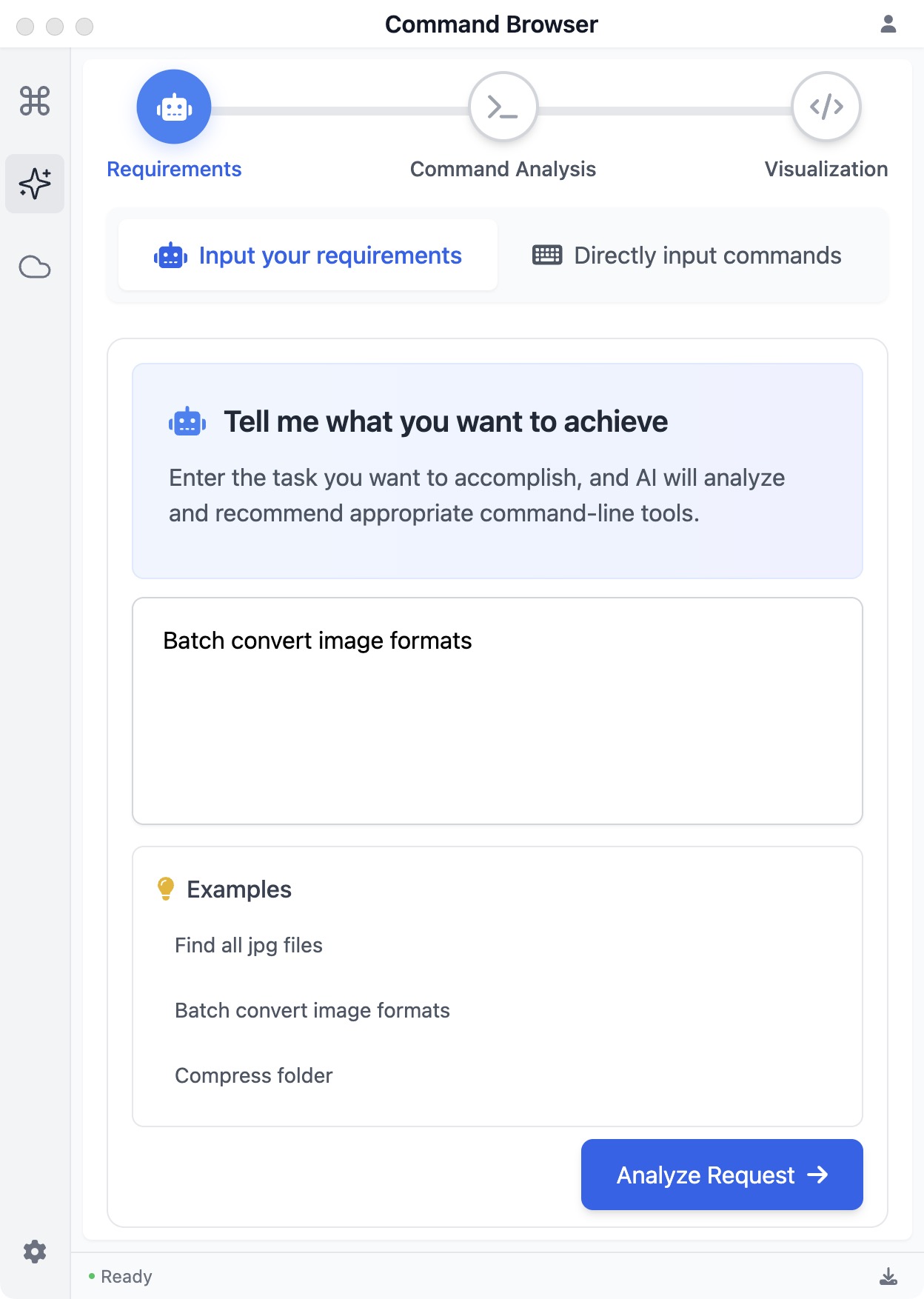
Choose from system commands, use built-in Quick Commands for instant execution, or create custom Command Apps for complex operations.

2

AI Analysis

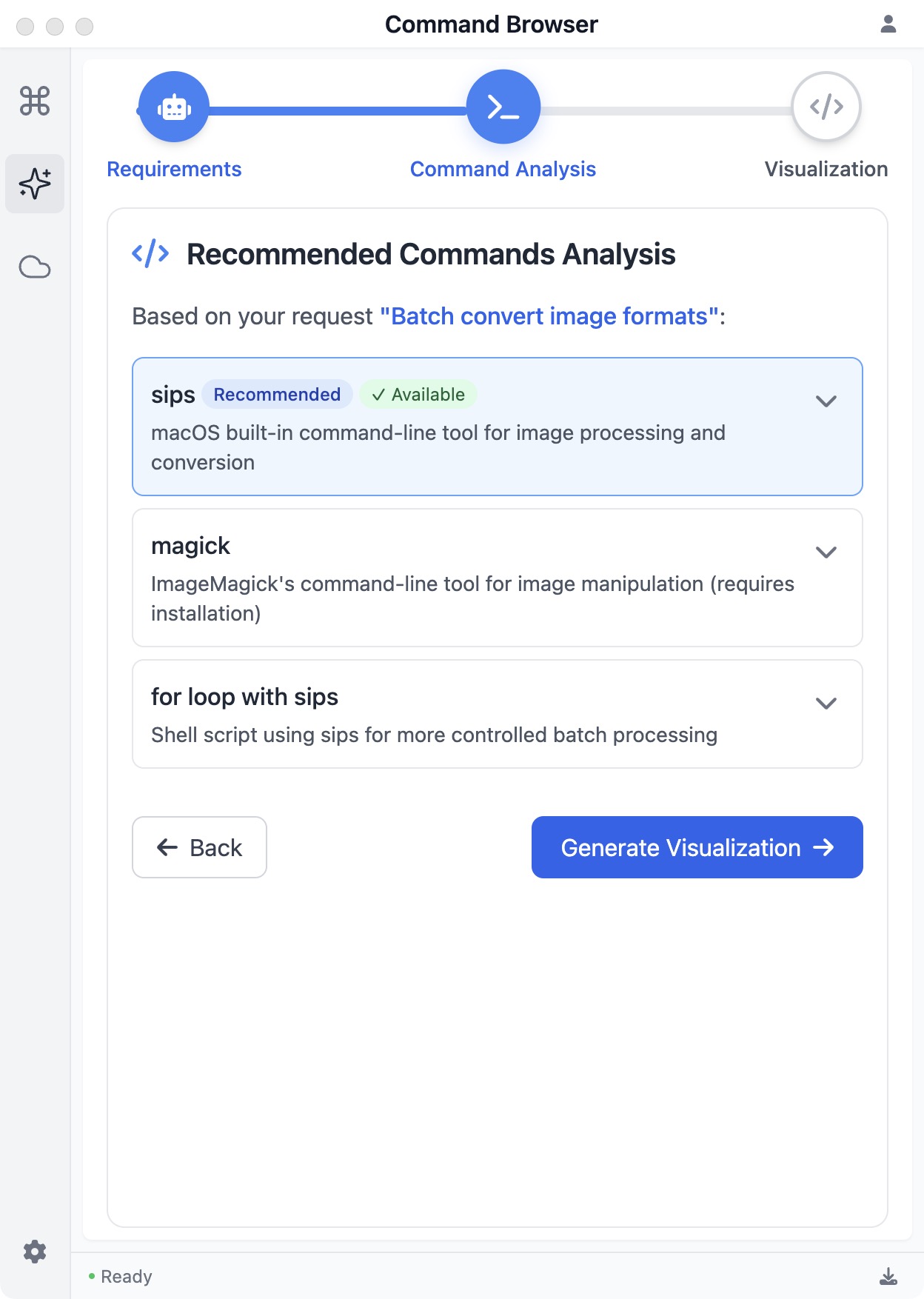
Our AI engine analyzes the command documentation to understand parameters and functionality.

3

Interface Generation

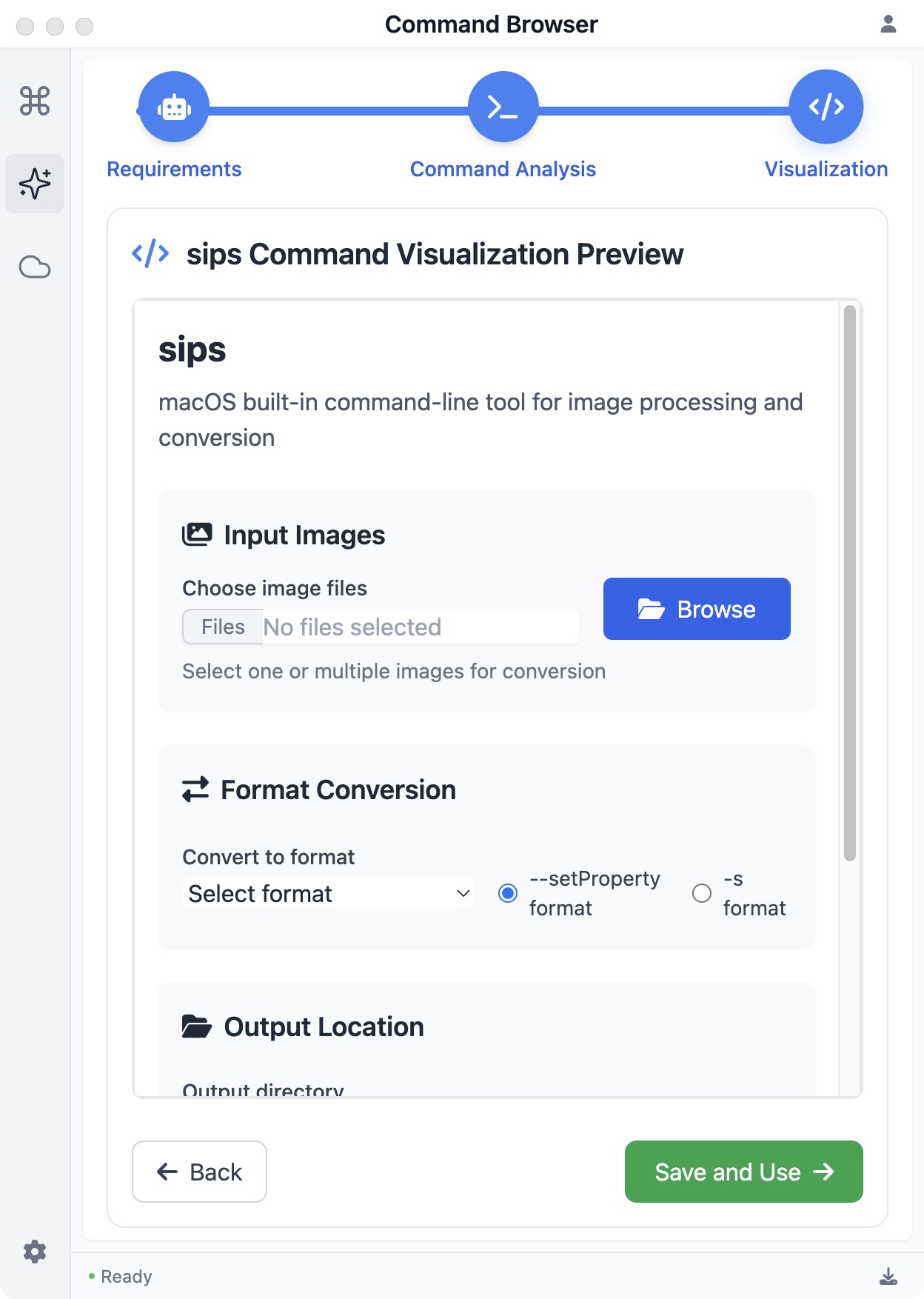
Based on the analysis, AI automatically creates an intuitive visual interface.

4

Interactive Use

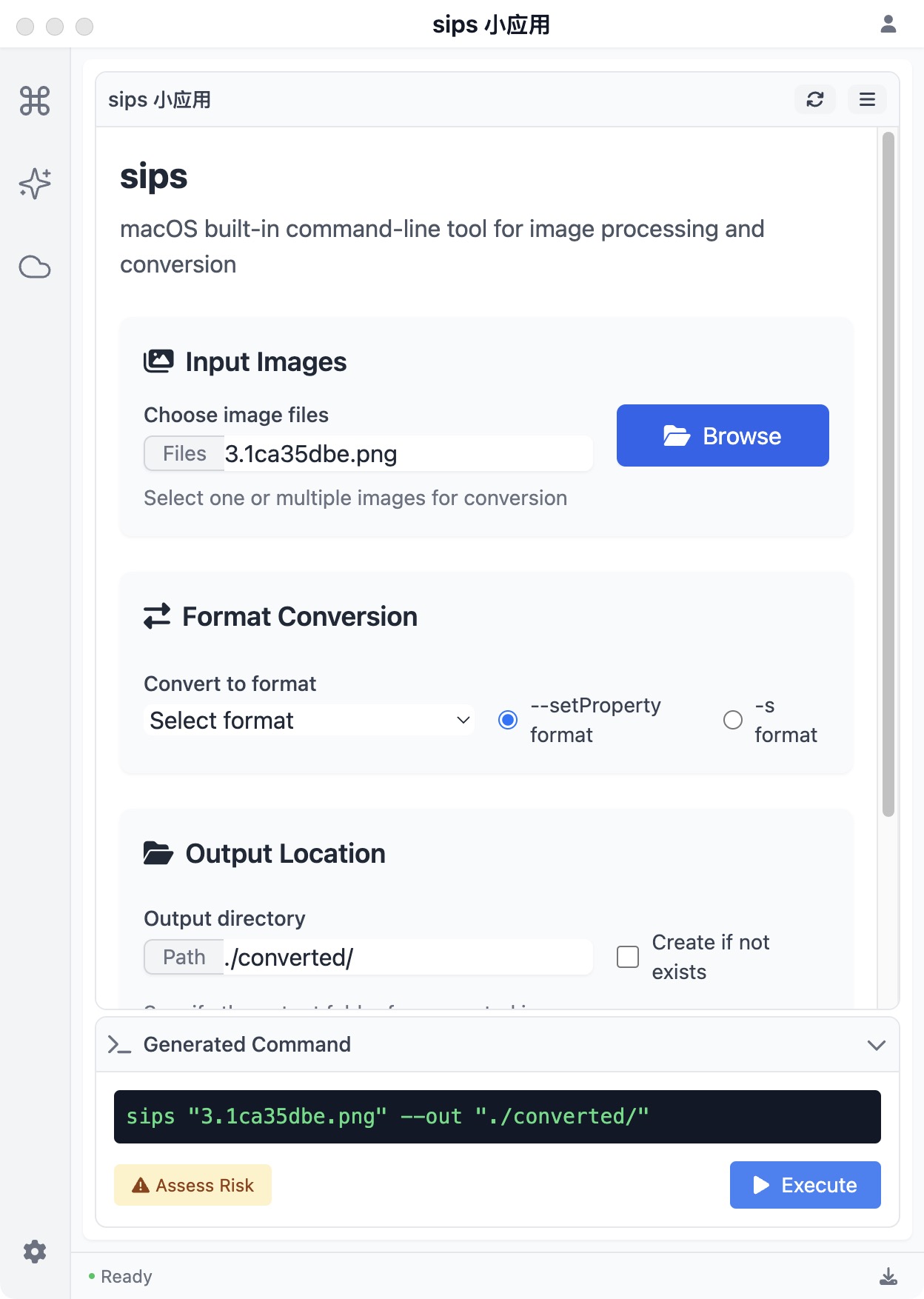
Operate the visual interface with simple clicks and CmdWise executes the corresponding command-line operations.
Real-World Application

See how CmdWise transforms complex commands into simple operations

Image Processing Made Simple

macOS's built-in 'sips' command is powerful for batch image processing, but remembering the parameters is challenging. CmdWise transforms it into an intuitive Command App with drag-and-drop interface:

  • Drag and drop image files
  • Select output format and dimensions
  • Adjust image quality and other parameters
  • Execute batch processing with one click

Simple, Transparent Pricing

🔥 Early Bird Discounts Available for a Limited Time

Free Plan

$0/Forever

  • Unlimited command visualization
  • 5 Command Apps seats
  • 5 Quick Commands seats
  • Basic AI generation capabilities
Download Free
MOST POPULAR

Pro Plan

$29/year

$49 (40% off)

Early Bird Pricing

  • Unlimited command visualization
  • Unlimited Command Apps & Quick Commands
  • Advanced AI generation capabilities
  • Homebrew integration & system detection
  • Priority support
Get Pro Access

Lifetime Access

$79

$129 (39% off)

Limited to 500 licenses

  • All Pro features
  • Unlimited Command Apps & Quick Commands
  • One-time payment
  • Lifetime updates
  • Priority support
Buy Lifetime

Seat Pack (+10)

Add 10 additional seats to any plan with a one-time purchase

$9.99 Add Seats

Frequently Asked Questions

CmdWise currently supports macOS, with Windows and major Linux distributions coming soon. Each platform is optimized to accommodate system-specific command features.
Before executing commands, CmdWise runs an AI risk assessment to detect potentially dangerous operations and provides a confirmation mechanism to ensure safety.
On the CmdWise main interface, select enter the command you want to visualize or choose from the system command list, wait for the AI to generate the interface, test and adjust as needed, then click "Save Command App" to complete the process.
Internet connection is required when creating a mini-app to use the AI service for generating interfaces. However, saved mini-apps can be used offline.
CmdWise includes a feedback mechanism. Click "Send Feedback" and provide more specific requirements, and the AI will regenerate a more suitable interface while maintaining version history.
Command Apps are AI-generated visual interfaces for complex commands with configurable parameters, perfect for tasks like image processing. Quick Commands are one-click shortcuts for common operations like screenshots or network tests—they use built-in templates that you can customize or create from scratch.
Yes! CmdWise automatically detects if Homebrew is installed and provides guided installation if needed. It also intelligently discovers available system commands and suggests Homebrew packages for missing commands, making it easy to expand your command-line toolkit.
Free users get 5 Command Apps and 5 Quick Commands. Each saved Command App or Quick Command uses one seat. You can delete unused items to free up seats, or upgrade to Pro for unlimited seats. Seat Packs add +10 seats to any plan.

Ready to Elevate Your Command Line Experience?

Download CmdWise today and experience AI-driven Command App creation. Make complex operations simple and intuitive.