FFmpeg Subtitle Extractor: Easy Video Subtitle Separation
Using the ffmpeg engine, extract embedded subtitles (soft subtitles) packaged in MKV, MP4 and other video files, and save them as independent .srt, .vtt, or .ass files.
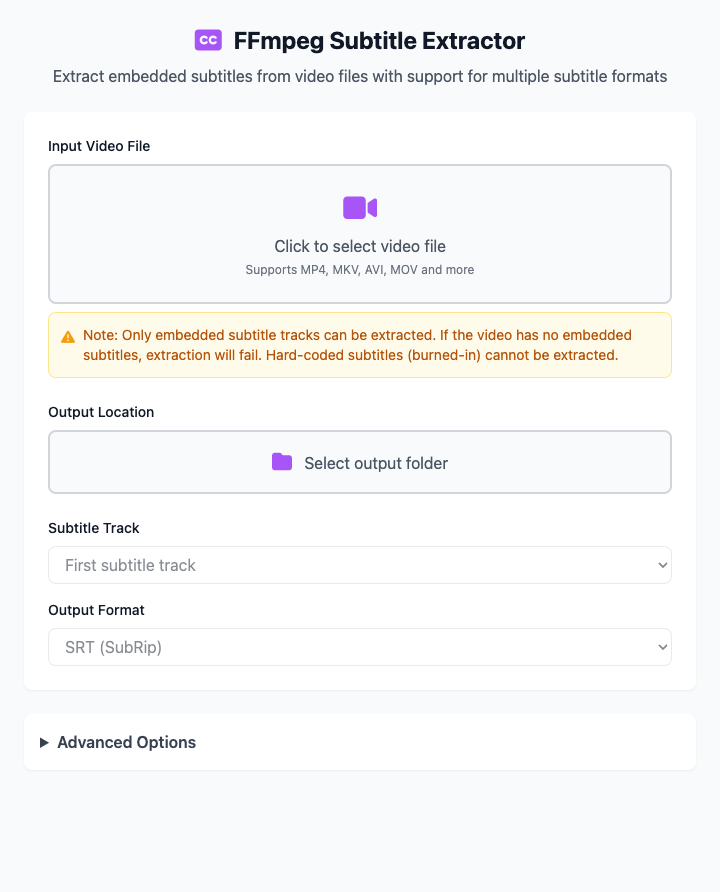
⚡️ Quick Start: Extract a Subtitle File
- Click to select a video file containing embedded subtitles.
- Select an output location for saving the subtitle file.
- Choose subtitle track and output format as needed (usually defaults are fine).
- Click the "Execute" button. After the command completes, you'll get a file containing the subtitles.
🤔 When Should I Use It?
- You downloaded a movie or TV series with embedded subtitles, and you want to extract them for separate use or editing.
- You want to obtain external subtitles from videos for language learning or translation.
- You need to convert video subtitles from one format (like
ASS) to another more universal format (likeSRT).
⚙️ Parameter Description
Subtitle Track: A video file may contain multiple language subtitle tracks. Here you choose which one to extract.
First subtitle trackusually corresponds to0, and so on. If you're not sure, you can start trying from0.Output Format: Choose the subtitle file format you want to save.
- SRT: (Recommended) The most compatible text subtitle format, supported by almost all players.
- VTT: Modern web video subtitle format, commonly used for HTML5 videos.
- ASS/SSA: Powerful advanced subtitle format supporting complex styles and effects, commonly used for anime and fan-made subtitles.
Advanced Options:
- Overwrite Existing Files: When enabled, if files with the same name exist in the output folder, they will be directly overwritten.
- Custom Filename: You can specify a new name for the output subtitle file (without extension). If left blank, it will default to using the original video's filename.
⚠️ Important: Soft Subtitles vs. Hard Subtitles
This tool can only extract "soft subtitles" and cannot handle "hard subtitles".
✔️ Soft Subtitles: Subtitles are packaged as independent text tracks in video files (especially MKV format), which can be freely turned on, off, or switched by players. This is the type this tool can extract.
❌ Hard Subtitles: Subtitles are directly "burned" or "encoded" into the video screen, becoming part of the image and cannot be separated. This type of subtitle cannot be extracted by any tool.
Dependency Installation
Before using this tool, you need to install FFmpeg on your Mac. If you have Homebrew installed, just run this once in the terminal:
brew install ffmpegRelated Tools
In the CmdWise app market, you can also find other video processing tools:
- FFmpeg Video Subtitle Tool: Encode subtitle files into videos
- FFmpeg Audio Extractor: Extract audio tracks from videos