Sips Image Resizer: Fast Proportional Compression
This is a lightweight application focused on "percentage scaling." When you don't need to worry about precise pixel values but want to quickly resize a batch of images to half (50%) or quarter (25%) of their original size, this tool will be very efficient.
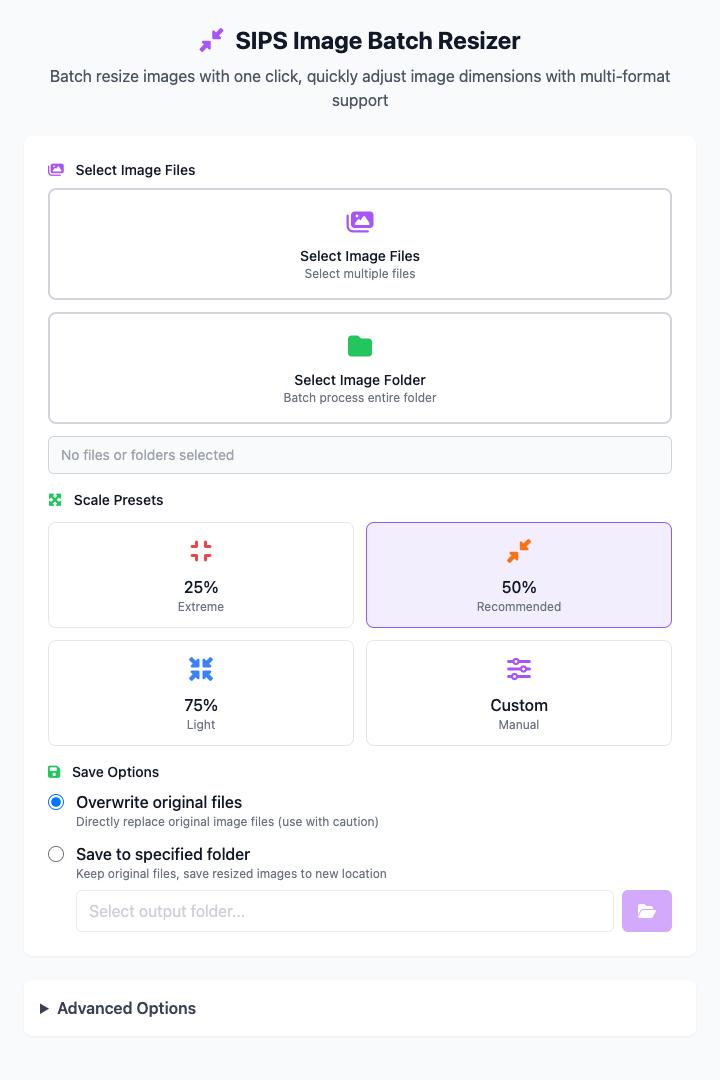
⚡️ Quick Start
- Select Images: Click "Select Image Folder" to add your images.
- Choose Scaling Ratio: Click the preset
50%button. - Choose Save Method: Select Save to Specified Folder and specify an output directory.
- Click the "Execute" Button: After the command completes, you'll get the resized image files.
🤔 When Should I Use It?
- You just took a bunch of high-resolution photos and want to resize them all to 50% for easy sharing via email or instant messaging.
- You need to prepare images for a blog post, but the originals are too large, so you want to quickly compress them to 75% of their original size to speed up web page loading.
- You simply want to save disk space by uniformly reducing the size of some backup images.
⚙️ Parameter Description
Select Image Files/Folder: Add source images that need processing. Supports single selection or batch processing of entire folders.
Scaling Presets:
- Preset Cards (25%, 50%, 75%): Quick selection of common reduction ratios.
- Custom: Activates the slider below for more precise ratio adjustment.
Custom Scaling Ratio: Only available when "Custom" preset is selected, allows you to set scaling values between 10% and 100% using the slider. 100% means keeping the original size.
Save Options:
- Overwrite Original Files: The operation will take effect directly on the original files, this operation cannot be undone.
- Save to Specified Folder: Save resized copies to your chosen folder, leaving original files unaffected (recommended).
⚠️ Important Notes
- This command depends on the
sipstool that comes with macOS, so it's only available on macOS. - "Overwrite Original Files" is a destructive operation. Please make sure you no longer need the original-sized images before executing.
- This is a responsive interface, and all your settings will be reflected in real-time in the command area below.
Related Tools
In the CmdWise app market, you can also find other sips series tools:
- Sips Image Batch Processor: If you need to scale by exact pixels (such as width 800px) instead of percentage, or need to perform rotation and format conversion simultaneously.
- Sips Image Rotator: Batch rotate images.
- Sips PNG to JPG Converter: Quickly convert PNG images to JPG.