Echo Text Output Demo
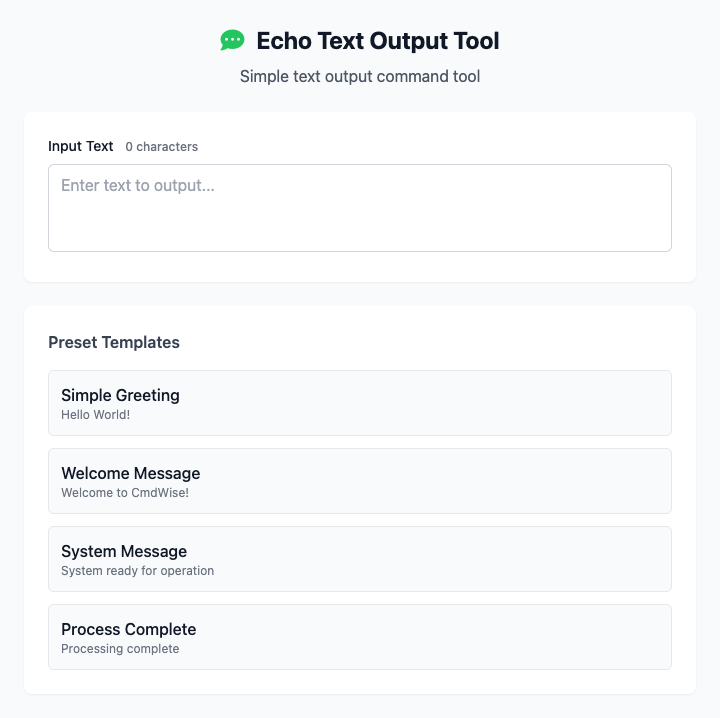
This is a visual wrapper for the basic echo command, and also a perfect introductory example for CmdWise app development. It helps you convert any input text into a standard terminal output command.
⚡️ Quick Start
- In the "Input Text" box, enter any text you want to output, like
Hello, CmdWise!. - Or, directly click a "preset template", such as "Simple Greeting".
- The command preview area below will immediately generate the corresponding
echocommand for you. - Click the "Execute" button, and you can see your input text in the terminal.
🤔 When should I use it?
- You are a beginner who wants to understand how CmdWise apps synchronize graphical interfaces with command-line parameters in real-time.
- You need to quickly generate an
echocommand containing specific text for script testing or teaching demonstrations. - You want to send simple text to the terminal but are too lazy to manually handle quotes and escaping.
⚙️ Parameter Description
- Input Text: Any content you want to output in the terminal. The tool automatically detects whether the text contains spaces or special characters and adds appropriate quotes for you.
- Preset Templates: Provides some common text phrases that can be quickly filled into the input box with a click, convenient for testing.
⚠️ Notes
- This tool is mainly for teaching and demonstration purposes, showcasing the core interaction logic of CmdWise applications.
- It relies on the
echocommand built into all Unix-like systems (including macOS), so no dependencies need to be installed. - Like all CmdWise apps, it's responsive - as you type, the command below updates in real-time.