QR Code Generator: Quickly Create QR Codes
This tool helps you convert text or URL links into QR code images with one click. Pure frontend processing, privacy-safe, no need to upload data.
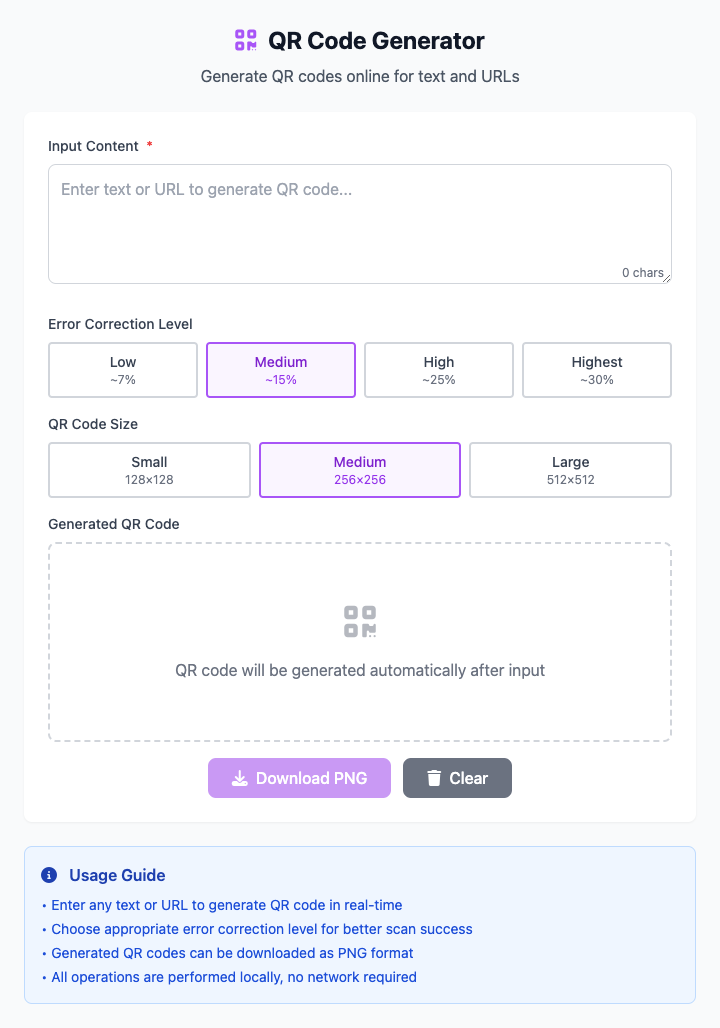
⚡️ Quick Start: Generate URL QR Code
- In the input box, paste your URL or enter some text.
- Click the "Download" button.
- Done! A new QR code image is now saved to your computer.
🤔 When Should I Use It?
- Want to send a very long URL to friends, making it convenient for them to scan and open with their phone.
- Want to create a QR code for your Wi-Fi network, letting guests scan to connect.
- Want to print an event registration link QR code on a poster.
- Want to quickly share your contact information (like email, phone number).
⚙️ Options and Settings
Content Input Box
Fill in all the information you want to convert to QR code here, such as URLs, text, contact information, etc.
Error Correction Level
This option determines whether the QR code can still be successfully scanned after part of it is blocked or damaged. The higher the level, the more complex the image.
- Medium (M - 15%): (Recommended) The best choice, balancing scanning speed and reliability, suitable for most daily scenarios.
- Low (L - 7%): The simplest image, but very sensitive to damage.
- High (Q - 25%) / Highest (H - 30%): If you're going to print the QR code on objects that are easily worn, you can choose these.
Size
The size of the generated QR code image.
- 256px: (Recommended) Suitable for most screen displays and regular printing.
- 128px: Smaller size, can be chosen if space is limited.
- 512px: Use when printing on large-format materials like posters to ensure clarity.
Click to view: Advanced Tips and Common Questions
Advanced Tips
- Optimize Content:
- Long Links: Use URL shortening services like
t.cn,bit.lyto generate simpler QR codes that are easier to scan. - Text Simplification: Avoid unnecessary characters and spaces.
- Long Links: Use URL shortening services like
- Usage Recommendations:
- Test Scanning: After generation, test with your phone to see if it can scan normally.
- Backup Content: Write down the original text or link used to generate the QR code, just in case.
Common Questions (FAQ)
Q: Why can't the QR code be generated? A: The input content might be too long. QR codes have a limited character capacity, please try to simplify your content.
Q: Why can't the generated QR code be scanned? A: The QR code image might be too small, or the print quality isn't clear enough. Try selecting a larger size or using a higher error correction level.
Q: Is this tool safe? Will my data be uploaded? A: Completely safe. All operations are completed locally in your browser, none of your input will be sent to network servers, absolute privacy protection.
Technical Details
- Core Technology: Based on
QRCode.jslibrary, using HTML5 Canvas for image rendering. - System Requirements: Supports all modern browsers (Chrome, Firefox, Safari, Edge), requires network for initial loading, then can be used offline.
- Compatible Devices: Adapted for computers, phones, tablets, and all devices.
Related Tools
In the CmdWise app marketplace, you can also find other useful tools:
- QR Code Terminal Generator: Command-line version QR code generation
- Text Processing Tools: Text format conversion
- Image Processing Tools: Image format conversion