Textutil Document Converter: Universal Document Format Conversion
This is a powerful tool based on macOS's native textutil command that allows you to quickly convert between TXT, RTF, HTML, DOC, DOCX, ODT, and other mainstream document formats without opening any heavyweight office software.
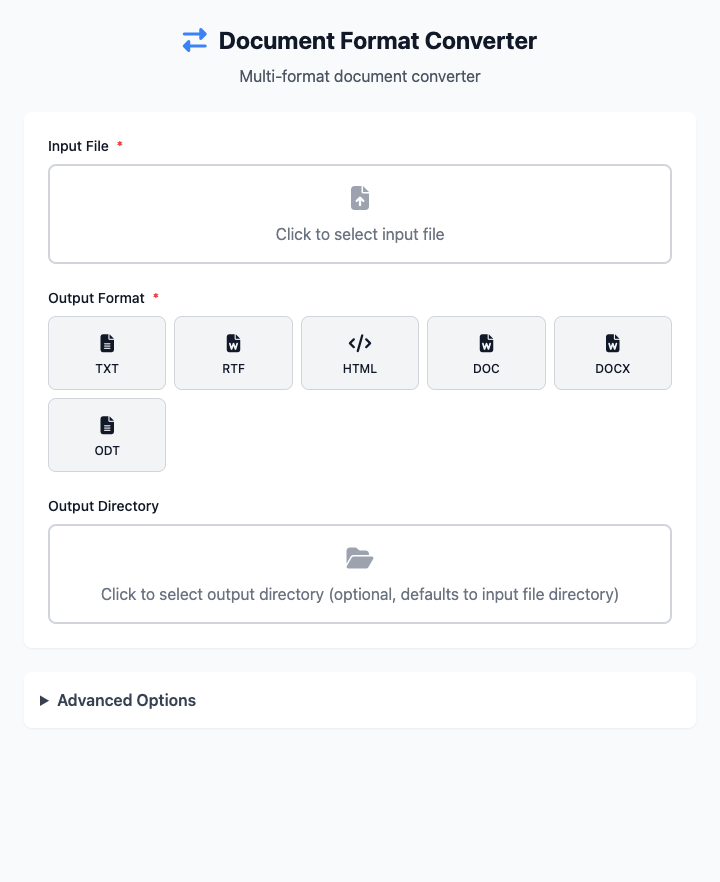
⚡️ Quick Start
- Select Input File: Click to select a document you want to convert (for example, a
.docxfile). - Choose Output Format: Click to select the target format you want to convert to, for example
html. - Choose Output Directory: Specify where the converted file should be saved. If left blank, it will default to the same directory as the original file.
- Click "Execute" Button: After the command completes, you'll get the converted file.
🤔 When Should I Use It?
- You received a
.docxfile, but you don't have Microsoft Word installed on your computer. You want to convert it to universal rich text (.rtf) or HTML to view it. - You need to convert a written Word document to plain text (.txt) for pasting into a system that only accepts unformatted text.
- You want to save a web page (.html) as a locally editable Word document (.docx).
⚙️ Parameter Settings
Input File: The source document that needs format conversion.
Output Format: The target document format you want to get.
Output Directory: Where the converted file will be saved. If left blank, the new file will be in the same directory as the original file.
Advanced Options:
- Batch Processing Mode: After activating this mode, "Input File" selection becomes "Input Directory", allowing batch conversion of all supported documents in an entire folder.
- Character Encoding: Defines the character set used when reading and writing files, very useful when processing old documents not in
UTF-8encoding. - Preserve Document Metadata: Determines whether to retain original author, title, and other information in the converted file.
⚠️ Important Notes
- This command depends on macOS's built-in
textutiltool, so it's only available on macOS. - Format conversion may cause some complex formatting (like special charts, macros in Word, etc.) to be lost, which is normal.
- This is a responsive interface - all your settings will be reflected in real-time in the command area below.
Related Tools
In the CmdWise app marketplace, you can also find other Textutil series document processing tools:
- Textutil Text Beautifier: If you just want to convert plain text (.txt) into styled rich text.
- Textutil Document Merger: Merge multiple documents into one.
- Textutil Document Metadata Viewer: View document metadata information like author, title, etc.