VitePress Video & Image Management
This is a behind-the-scenes story of CmdWise website documentation system, documenting how we automatically upload images and videos from local
assets/to R2, then replace relative paths in documentation with public domain URLs.
✨ Why Do This?
Repository Size Keeps Growing
VitePress documentation includes many screenshots and demo videos. Long-term accumulation makes both Git repository and Cloudflare Pages deployment packages bloated.Deployment Has File Count & Size Limits
Pages free tier has limits on object count and total size. Uploads will fail when exceeding quota.Want to Fully Utilize R2's Low-Cost Storage + CDN
Being in the same Cloudflare ecosystem, domain and cache configuration naturally fit together.
🛠️ Solution Overview
Key Points:
- Original Path & Filename: Cloud uses
docs/assets/<local-subdirectory>/<filename>, no hash renaming. Directory structure completely matches repository, beneficial for SEO / debugging. - Incremental Upload: Script calculates
sha1for each file and stores in.asset-map.json. Only calls R2 API when file content changes or is new, others directlyskip. - Content Hash Only for Comparison: Although filename doesn't change, still use hash to detect upload necessity.
- Low Intrusion: Authors write relative paths as usual, build stage automatically replaces with CDN URLs.
Key Script
Path: packages/docs/scripts/upload-to-r2.js
# View help
node scripts/upload-to-r2.js --help

# Dry run, print plan without execution
pnpm run assets:sync --dry

# Actually sync
pnpm run assets:sync
Script uses @aws-sdk/client-s3 to directly connect R2, compatible with S3 protocol.
🧰 Environment & Configuration
- Node ≥18, package manager pnpm / npm.
- Cloudflare R2 bucket:
cmdwise-assets. - Prepare
.envin projectpackages/docsdirectory:
R2_ACCOUNT_ID=xxxxxxxxxxxxxxxx
R2_ACCESS_KEY_ID=xxxxxxxxxxxx
R2_SECRET_ACCESS_KEY=xxxxxxxxxxxxxxxxxxxxxxxx
R2_BUCKET=cmdwise-assets
R2_PUBLIC_BASE_URL=https://assets.cmdwise.app    # Or use native URL first
Please don't commit
.envto repository, ensure it's excluded in.gitignore.
🌐 CNAME Configuration Guide
- Cloudflare Dashboard → R2 › Custom Domains → Add custom domain
- Enter
assets.cmdwise.app, select bucketcmdwise-assets, confirm. - System automatically adds a CNAME record in same account DNS:txt
Type: CNAME Name: assets Content: <accountid>.r2.cloudflarestorage.com Proxy Status: Proxied - Wait for DNS propagation (usually < 1 minute).
- Set
R2_PUBLIC_BASE_URLtohttps://assets.cmdwise.appin.env/ Secrets.
To switch domains, just change
R2_PUBLIC_BASE_URLand re-runassets:sync. Script will batch replace URLs.
🔍 More Technical Details
| Topic | Description |
|---|---|
| S3Client Configuration | forcePathStyle: true to avoid virtual host style subdomain certificate mismatch causing TLS handshake failure |
| Runtime Parameters | --dry only prints operations, --env .env.prod specifies additional environment file |
| Directory Prefix | Unified upload to docs/assets/. Future website resources can use website/assets/ without affecting existing logic |
| Future Plans | Reserved hooks for image compression (WebP) / video transcoding (WebM), process buf before upload |
Cloudflare Operations Checklist
- [x] Obtain R2_ACCOUNT_ID.
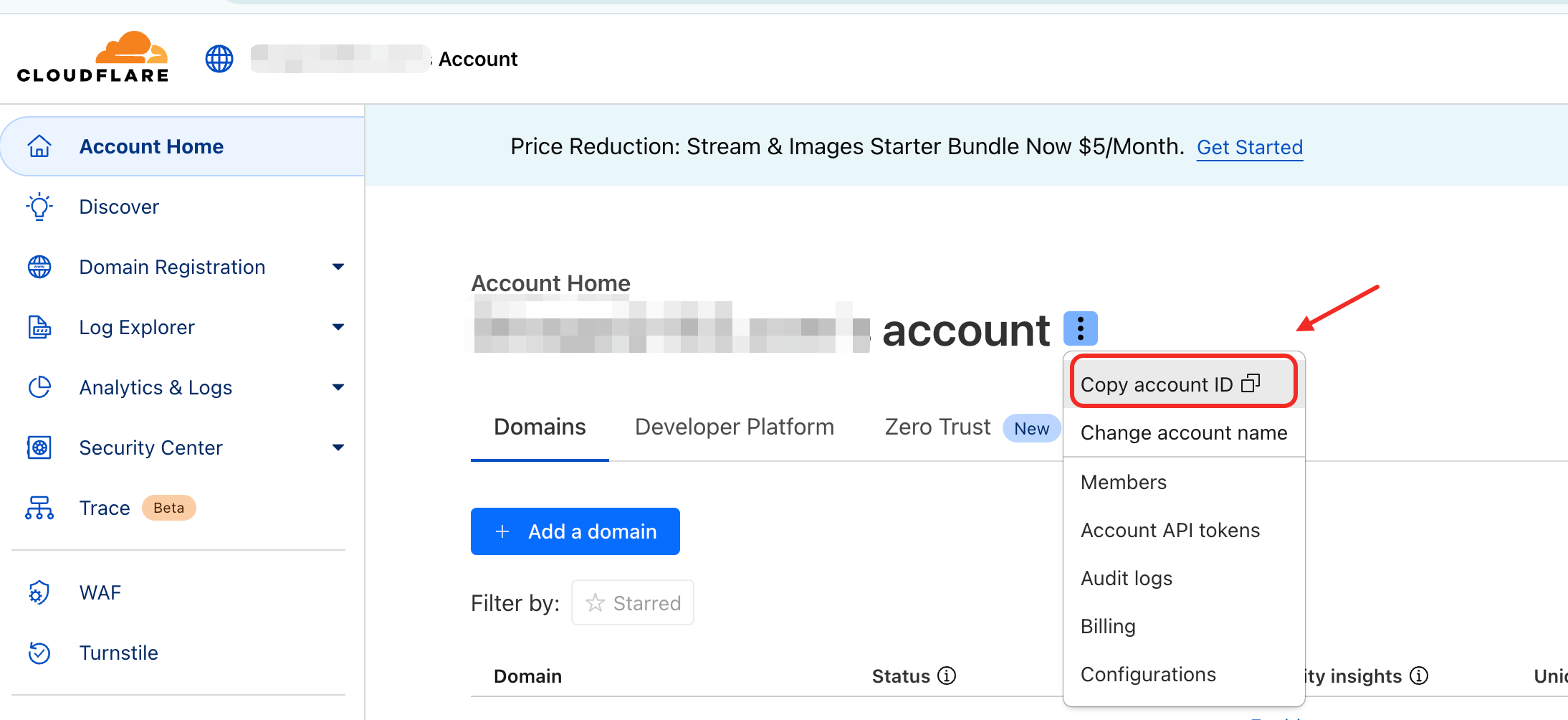
- [x] Create R2 bucket
cmdwise-assets. - [x] Create access key for R2 bucket
cmdwise-assets, obtain R2_ACCESS_KEY_ID and R2_SECRET_ACCESS_KEY.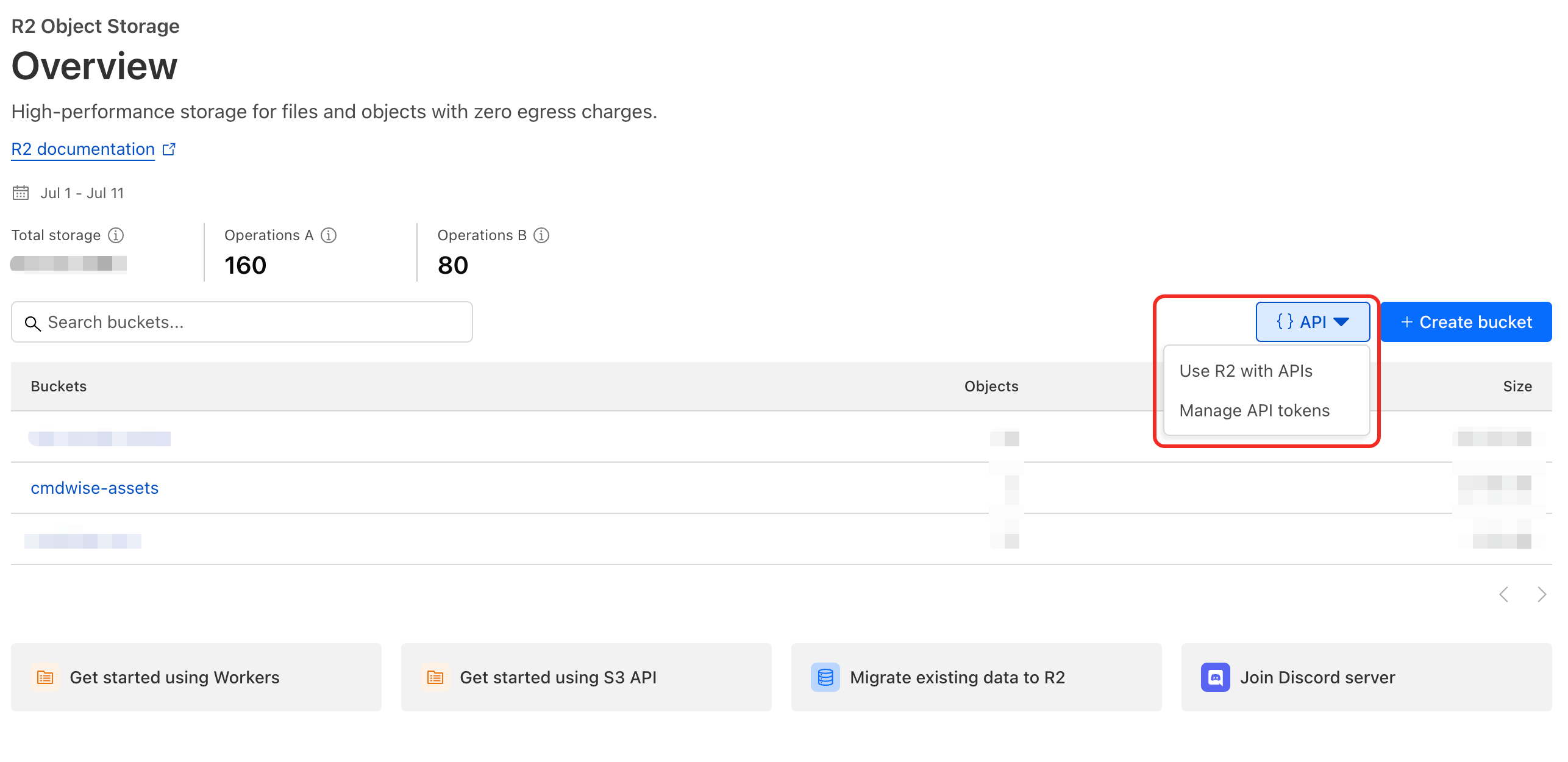
✅ Local Verification Checklist
- [x]
pnpm isucceeds, no dependency errors. - [x]
pnpm run assets:sync --dryoutputs sync plan. - [x]
pnpm run assets:syncgenerates/updates.asset-map.json. - [x]
./assets/…links in Markdown replaced withhttps://assets.cmdwise.app/…. - [x] Run
pnpm run dev, images/videos load normally on page. - [x] R2 Dashboard shows newly uploaded objects.
🚀 CI Integration Snippet (GitHub Actions)
- name: Sync docs assets to R2
  run: pnpm --filter @cmdwise/docs run assets:sync
  env:
    R2_ACCOUNT_ID: ${{ secrets.R2_ACCOUNT_ID }}
    R2_ACCESS_KEY_ID: ${{ secrets.R2_ACCESS_KEY_ID }}
    R2_SECRET_ACCESS_KEY: ${{ secrets.R2_SECRET_ACCESS_KEY }}
    R2_BUCKET: cmdwise-assets
    R2_PUBLIC_BASE_URL: https://assets.cmdwise.app
Execute before vitepress build.
🩺 Typical Issue Troubleshooting
| Symptom | Log/Error | Investigation & Solution |
|---|---|---|
EPROTO / sslv3 alert handshake failure | CLI error | Confirm script has set forcePathStyle: true, check if endpoint domain matches certificate |
Missing credentials | Runtime exit | Check if 4 R2 variables in .env or Secrets are filled correctly |
| Image 404 | Browser load failure | 1) Check if .asset-map.json contains URL 2) Verify R2 Dashboard object key is correct |
| Very slow upload | Massive HeadObject/PutObject calls | Usually incremental invalidation, check if repository cleared .asset-map.json or changed path prefix |
| CDN not refreshed | After renaming resource still shows old image | Due to same-name overwrite, Edge may cache; can add version number directory or use hash naming strategy |
⚖️ Solution Comparison & Selection
| Dimension | Current Solution (Original Directory+Filename) | Hash Filename Solution | Workers Proxy Solution |
|---|---|---|---|
| SEO Friendly | ✅ Readable URLs | ❌ Unreadable | ✅ Preserves original paths |
| CDN Caching | Medium, filename unchanged needs short cache or version directories | Excellent, can cache long-term | Same as current |
| Implementation Complexity | Low | Medium (need to rewrite filename+Map) | High (need to write Workers) |
| Local Author Experience | Original paths work | Write relative paths but final URLs change | Original paths work |
| Incremental Upload Implementation | Already supported | Need to combine with Map | Still need Map |
Considering CmdWise documentation scale and maintainability, current solution is most balanced. If future large-scale image changes or higher cache hit requirements emerge, we can re-evaluate hash filename solution.