Textutil Document Merger: Combine Multiple Documents into One
This is an application based on macOS's native textutil command, specifically designed to merge multiple independent text documents (supports TXT, RTF, DOCX, HTML, etc.) into one complete file. Whether merging novel chapters, meeting minutes, or organizing log files, it can handle them with ease.
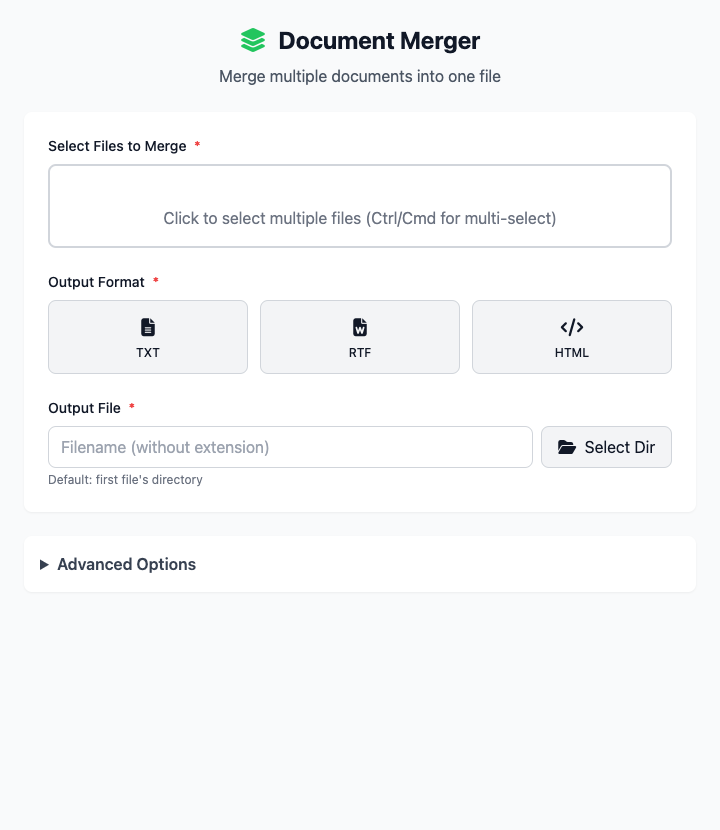
⚡️ Quick Start
- Select Files: Click the file selection area to choose all documents that need to be merged.
- Adjust Order: In the file list, drag and drop to adjust the order of each document in the merged file.
- Choose Output Format: Select the final format for the merged file, such as
docx. - Set Output File: Enter the merged file name and choose a save directory.
- Click "Execute" Button: After the command completes, you'll get the merged file.
🤔 When Should I Use It?
- You wrote different chapters of a book and now need to merge these separate
.docxfiles into one complete final draft. - You collected a series of
.txtformat log files and want to join them in order into one large log archive. - You want to merge several related
.rtfdocuments together for one-time printing or review.
⚙️ Parameter Settings
Select Files to Merge: Add all source documents that need to be merged.
File List: Shows added files and allows order adjustment through drag and drop. Merging will strictly follow the top-to-bottom order of this list.
Output Format: Defines the save format for the merged single file, supports TXT, RTF, HTML, DOC, DOCX, etc.
Output File:
- File Name: Set the name of the merged file (without extension).
- Choose Directory: Specify where the merged file will be saved.
Advanced Options:
- File Separation: Can insert line breaks or page breaks between merged content to distinguish content from different files.
- Character Encoding: Specify character set for the output file, useful when processing old files with mixed encodings.
⚠️ Important Notes
- This command depends on macOS's built-in
textutiltool, so it's only available on macOS. - During merging, all source file contents will be concatenated in the order you arrange them in the file list.
- Please ensure all files to be merged have similar text content and encoding to avoid garbled text or formatting issues after merging.
Related Tools
In the CmdWise app marketplace, you can also find other Textutil series document processing tools:
- Textutil Document Converter: Before and after merging, you may need this to unify all document formats.
- Textutil Text Beautifier: If you just want to convert plain text (.txt) into styled rich text.
- Textutil Document Metadata Viewer: View document metadata information like author, title, etc.