Edge TTS: Free Text to Natural Speech
Using the powerful online speech synthesis service behind Microsoft Edge browser, easily convert long text into natural-sounding, human-like audio files (supports MP3, WAV, WebM).
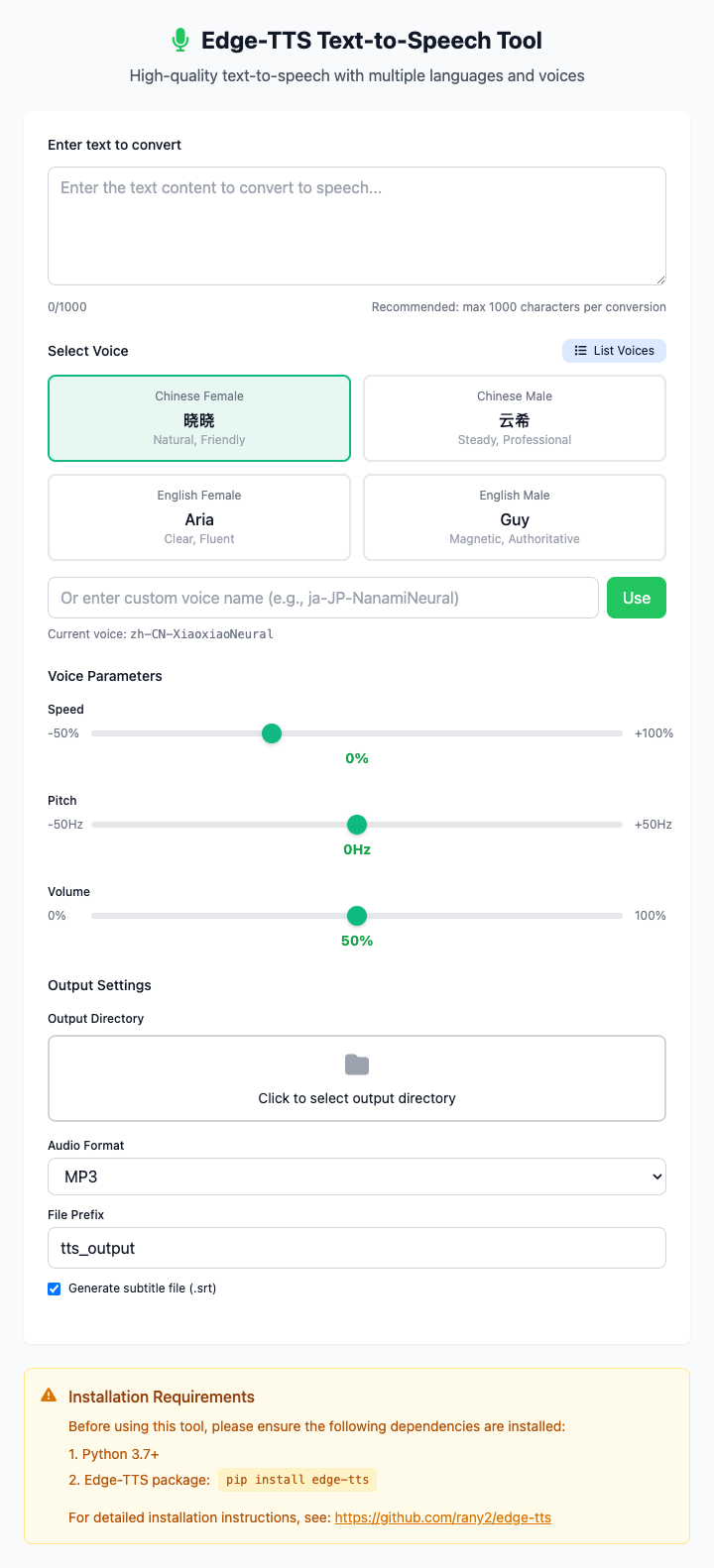
⚡️ Quick Start: Convert Text
- In the text box, paste or type the text you want to convert.
- Click a voice preset button (such as "Xiaoxiao"), or paste a complete voice name in the input box below.
- (Optional) Click to select an output directory to specify where to save the audio file.
- Adjust voice parameters: speed, pitch, volume, etc. (optional).
- Click the "Execute" button.
- Done! The converted audio file will be saved in the specified directory.
🤔 When should I use this?
- You want to create a video voiceover or podcast but don't want to use your own voice.
- You want to "listen" to a long article or e-book to give your eyes a break.
- You're learning a foreign language and want to hear standard pronunciation.
- You want to quickly generate some voice prompts for your app or presentation.
⚙️ Options & Settings
Text Input
- Character Count: The interface displays the character count of input text in real-time. It's recommended to keep single conversions under 1000 characters for best results.
- Text Limit: When exceeding the recommended character count, the interface will show color prompts to help you control text length.
Voice Selection
You can choose a voice in three ways:
Click Presets: We provide preset buttons for common Chinese and English voices - just click to select.
Custom Input: You can find any voice name you like from the
edge-tts --list-voicescommand results (such asja-JP-NanamiNeural) and paste it into the input box.Query Voices: Click the "Query Voices" button on the interface to get a complete list of all available voices, making it easy to choose voices in other languages or styles.
Chinese Recommendations:
zh-CN-XiaoxiaoNeural(Female, Standard Mandarin)zh-CN-YunxiNeural(Male, Standard Mandarin)zh-CN-liaoning-XiaobeiNeural(Female, Northeast accent)zh-CN-shaanxi-XiaoniNeural(Female, Shaanxi accent)
English Recommendations:
en-US-AriaNeural(Female, Standard American)en-GB-SoniaNeural(Female, Standard British)
Voice Parameters
You can fine-tune the generated voice:
- Speed (Rate): Speed up or slow down the reading pace.
- Pitch: Adjust the fundamental frequency of the voice to make it sound higher or lower.
- Volume: Adjust the volume of the generated audio.
Output Settings
- Output Directory: Click to select where to save the audio file; if not set, it will be saved to the current directory.
- Audio Format: You can choose to output
mp3,wav, orwebmformat audio files. - File Prefix: Customize the name prefix for output files.
- Generate Subtitles: Optionally generate
.srtsubtitle files with timestamp information, convenient for video production.
Click to view: Dependency Installation & Common Issues
Dependency Installation
This tool depends on the edge-tts Python package. You need to first install Python and pip on your Mac, then run this once in Terminal:
pip install edge-ttsIf you don't have Python installed yet, it's recommended to install it through Homebrew: brew install python.
Common Issues (FAQ)
Q: Is this service completely free? Are there character limits? A: Yes, Microsoft Edge's TTS service is currently free and doesn't require mandatory API keys. However, it has limits on text length per conversion. If your text is very long (e.g., tens of thousands of characters), it's recommended to convert in segments.
Q: Why isn't my selected voice working? A: Please ensure your voice name is complete, such as zh-CN-XiaoxiaoNeural. Also, edge-tts requires internet connection to work, so please check your network connection.
Q: Is the conversion speed fast? A: Very fast. Since it's an online service, conversion speed mainly depends on your network condition and text length, usually completing within seconds.
Technical Notes
- Core Tool: Based on the edge-tts command-line tool, which is a Python library that calls Microsoft Edge browser's undocumented online TTS service.
- Privacy Note: Since this is an online service, your input text will be sent to Microsoft's servers for processing. Please don't use it to convert highly sensitive or private information.
- System Requirements: macOS 10.12 or higher, with Python and
edge-ttsinstalled.
Related Tools
In the CmdWise app marketplace, you can also find other audio processing tools:
- say Batch Text-to-Speech: Use macOS built-in offline speech synthesis
- sox Audio Format Converter: Convert between various audio formats
- FFmpeg Audio Extractor: Extract audio tracks from videos