Textutil Metadata Editor: Edit Document "Identity" Information
This is a professional tool based on the textutil command that allows you to dive deep into documents and view and edit usually invisible "metadata" such as author, title, copyright, creation date, etc. This is very useful for standardizing document properties, protecting copyright, or updating file information.
⚡️ Quick Start
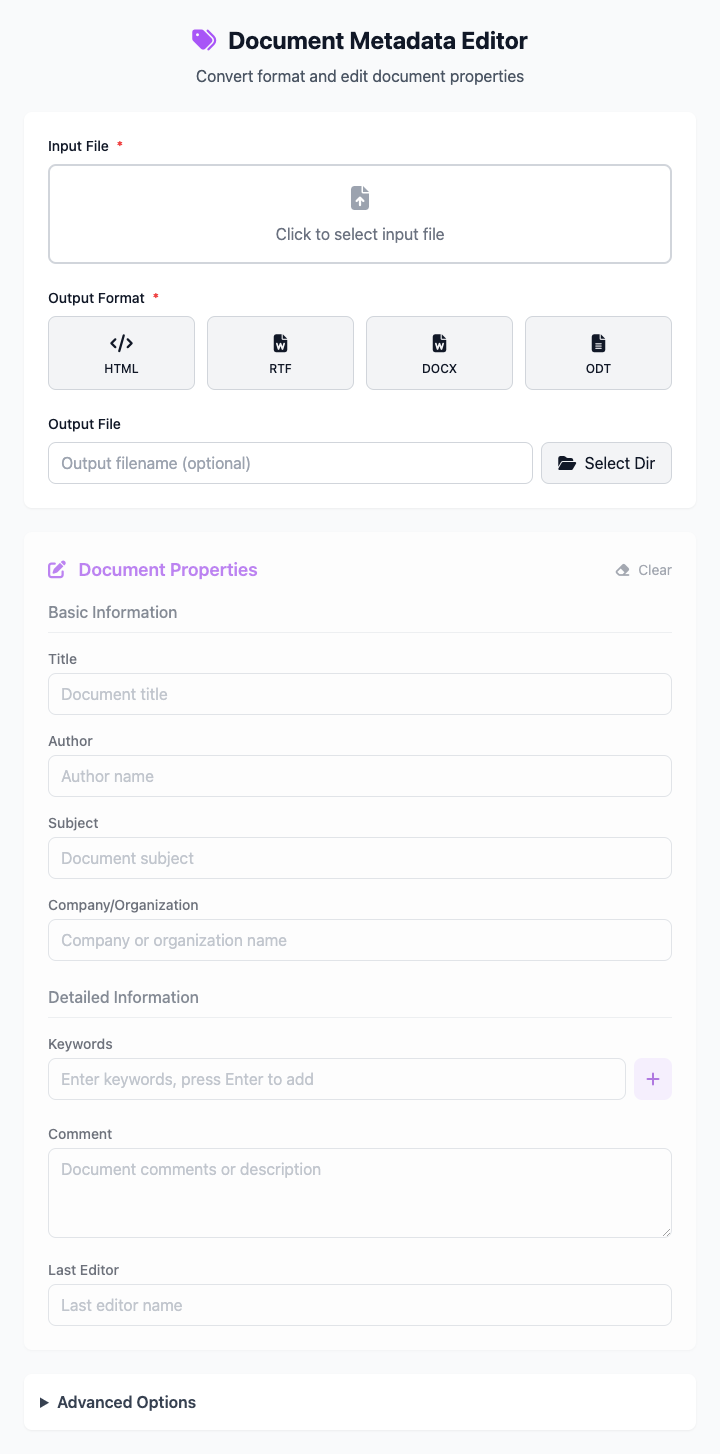
- Select Input File: Click to select a document whose metadata needs editing (like a
.docxfile). - Edit Document Properties: In the "Document Properties" area below, fill in or modify the "Title" and "Author" fields.
- Choose Output Format: Keep the same format as the original file, or select a new format.
- Set Output File: Enter the filename and choose a save directory.
- Click "Execute" Button: After the command completes, you'll get the modified file.
🤔 When Should I Use It?
- You want to officially put your name (author field) and title on a report or document you created.
- You need to uniformly add copyright information (copyright field) to a batch of company documents.
- You're organizing files and want to add meaningful keywords to make them easier to find through Spotlight search in the future.
- You want to modify a file's "creation date" or "modification date" and other timestamp information.
⚙️ Parameter Settings
Input File: The source document whose metadata needs editing.
Output Format: Defines the save format for the processed file. You can perform format conversion while editing metadata.
Output File: Set the name and save location of the output file.
Document Properties:
- Basic Information: Includes title, author, subject.
- Additional Information: Includes keywords (comma-separated), comments, copyright statement.
- Timestamps: Manually set document creation and modification date and time.
Advanced Options:
- Batch Processing Mode: When enabled, you can apply the same metadata modifications to documents in an entire folder (except specific fields like title).
- One-Click Clear: Can quickly clear all filled metadata information to start fresh.
⚠️ Important Notes
- This command depends on macOS's built-in
textutiltool, so it's only available on macOS. - Not all document formats support all metadata fields. For example, plain text files (.txt) usually don't contain rich metadata.
- This is a responsive interface - all your settings will be reflected in real-time in the command area below.
Related Tools
In the CmdWise app marketplace, you can also find other Textutil series document processing tools:
- Textutil Document Converter: If you only care about format conversion and not metadata.
- Textutil Document Merger: Merge multiple documents into one.
- Textutil Text Beautifier: If your goal is just to convert plain text (.txt) into styled rich text.