Sips Image Rotator: Batch Image Orientation Correction
This tool leverages macOS's built-in sips command to provide you with a simple and efficient way to rotate images. Whether you need to correct the shooting angle of a single photo or batch-unify the orientation of all images in a folder, it can handle the task.
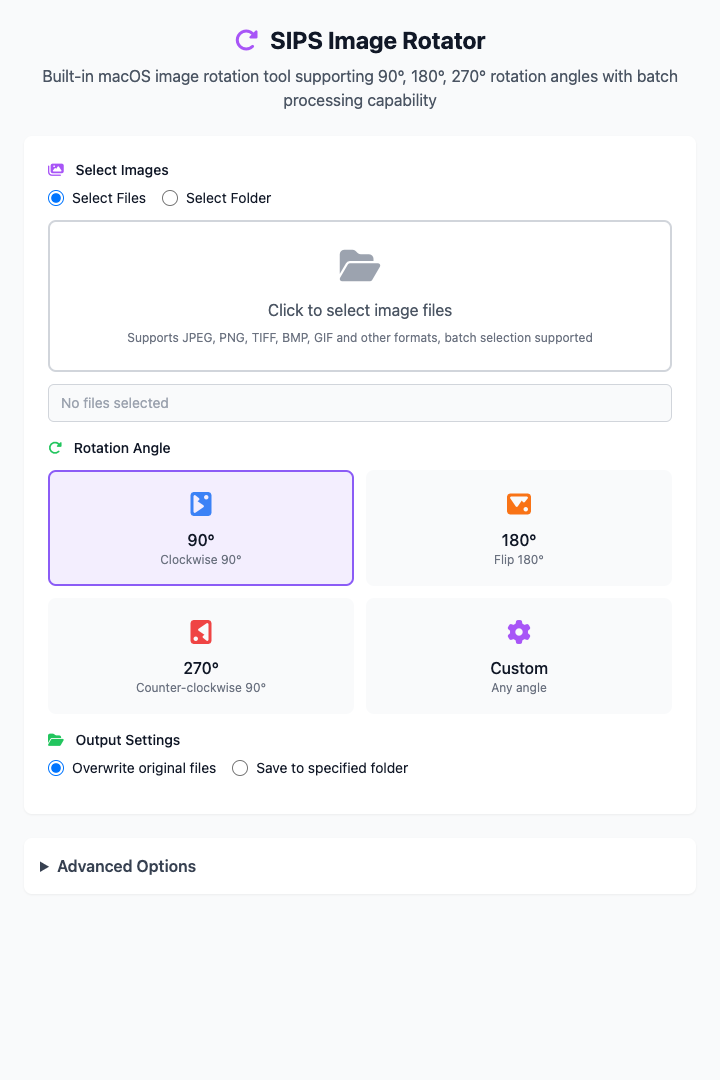
⚡️ Quick Start
- Select Images: Click "Select Folder" mode, then add your images.
- Choose Rotation Angle: Click a preset angle card, such as "90°" (clockwise rotation of 90 degrees).
- Choose Output Method: Select "Save to Specified Folder" and specify a directory.
- Click the "Execute" Button: After the command completes, you'll get the rotated image files.
🤔 When Should I Use It?
- You took some portrait photos with your phone that are "lying down" when displayed on the computer, and need to batch rotate them 90 degrees to the right (clockwise).
- You scanned a batch of files, but some pages are upside down and need 180-degree rotation.
- You got a design image that looks slightly tilted and want to fine-tune it, such as rotating it 3 degrees counterclockwise (input
-3).
⚙️ Parameter Description
Select Images:
- Select File/Folder: Specify the source file or folder for operations. Supports batch processing.
Rotation Angle:
- Preset Cards: Quick selection of 90° (clockwise), 180°, or 270° (counterclockwise 90°).
- Custom: After activating the input box, you can manually enter any integer angle between -360 and 360. Positive numbers represent clockwise, negative numbers represent counterclockwise.
Output Settings:
- Overwrite Original Files: Directly modify the original files (this operation cannot be undone).
- Save to Specified Folder: Save rotated image copies to a new directory without affecting original files (recommended).
⚠️ Important Notes
- This command depends on the
sipstool that comes with macOS, so it's only available on macOS. - "Overwrite Original Files" is a destructive operation. Please confirm you no longer need the original orientation images before executing.
- This is a responsive interface, and all your settings will be reflected in real-time in the command area below.
Related Tools
In the CmdWise app market, you can also find other sips series tools:
- Sips Image Batch Processor: If you need to perform rotation, scaling, and format conversion simultaneously.
- Sips Image Resizer: Batch modify image dimensions.
- Sips PNG to JPG Converter: Quickly convert PNG images to JPG.