Sips Image Batch Processor: Convert, Scale, Rotate All-in-One
This is a multi-in-one application that makes full use of macOS's built-in powerful image scripting system (sips), allowing you to complete the most common image batch processing tasks like format conversion, size scaling, and content rotation in one place without installing any third-party software.
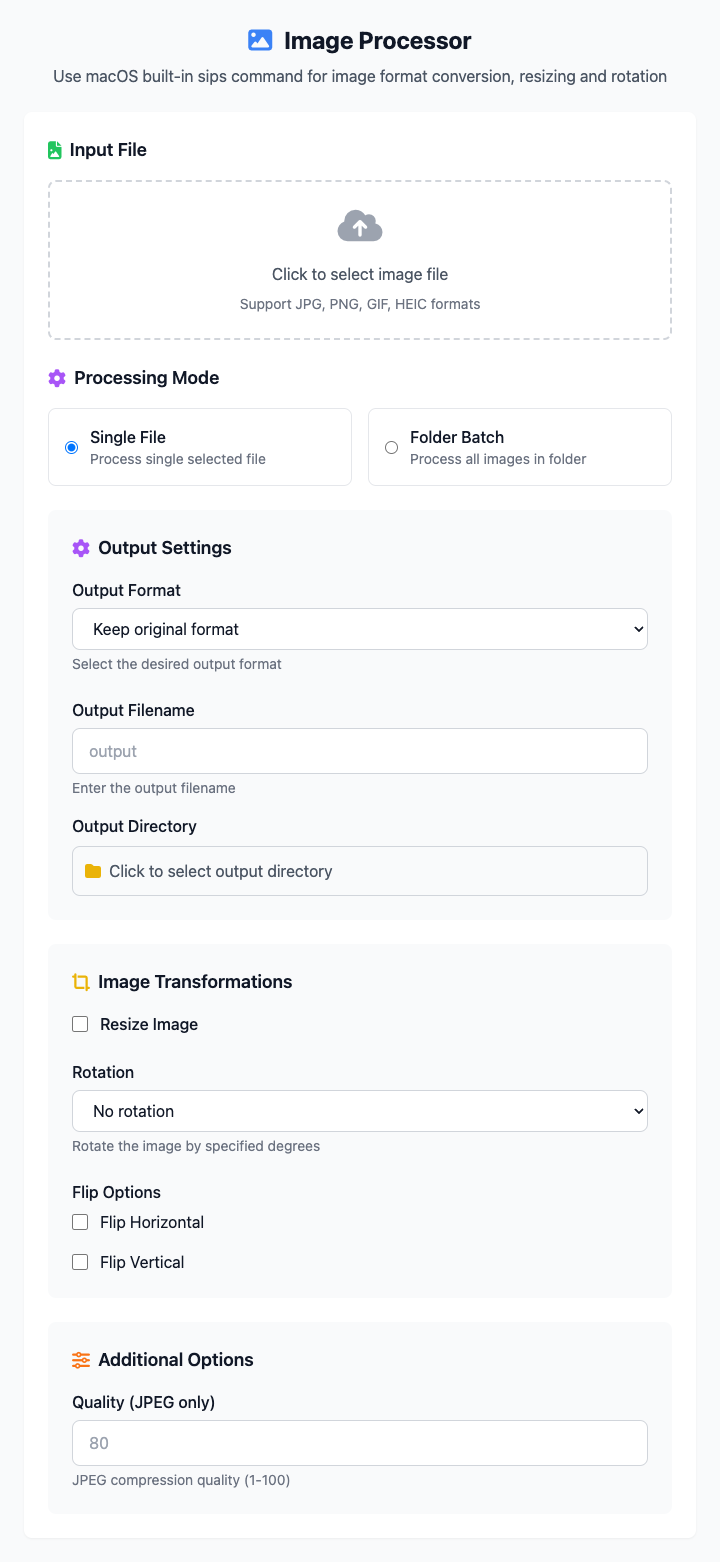
⚡️ Quick Start: Resize All Images in a Folder to 800px Width
- Select Processing Mode: Click Folder Batch.
- Select Source Folder and Output Directory.
- Enable Scaling: Check the "Enable Scaling" checkbox.
- Enter
800in the "Width" input field and keep "Maintain Aspect Ratio" checked. - Click the "Execute" Button: After the command completes, you'll get the processed image files.
🤔 When Should I Use It?
- You have a bunch of images from different devices with various formats and want to uniformly convert them to JPG format.
- You need to prepare a set of product images for a website, requiring width not exceeding 800 pixels.
- Some photos were taken in portrait mode and need to be batch rotated 90 degrees on the computer.
- You need to complete multiple tasks simultaneously, for example, converting a folder of images to PNG, scaling to 1200px, and rotating 90 degrees.
⚙️ Parameter Description
Processing Mode:
- Single File Processing: Operations on a selected image file.
- Folder Batch: Apply the same processing rules to all image files in a specified folder.
Output Settings:
- Output Format: Define the save format for processed images. Supports PNG, JPEG, GIF, BMP, TIFF, etc.
- Output Directory: All processed images will be saved in this folder.
Image Transformation:
- Enable Scaling:
- Width/Height: Set the target dimensions for the image. If "Maintain Aspect Ratio" is checked, only one needs to be filled.
- Maintain Aspect Ratio: When checked, scaling will maintain the original proportions of the image, avoiding image stretching deformation.
- Rotation Angle: Rotate the image clockwise by 90°, 180°, or 270°.
- Enable Scaling:
⚠️ Important Notes
- This command depends on the
sipstool that comes with macOS, so it's only available on macOS. - During batch processing, all images will be uniformly processed and saved to the output directory, with original filenames preserved.
- This is a responsive interface, and all your settings will be reflected in real-time in the command area below.
Related Tools
In the CmdWise app market, you can also find more focused sips series tools:
- Sips Image Resizer: If you only need to batch modify image dimensions.
- Sips Image Rotator: If you only need to batch rotate images.
- Sips PNG to JPG Converter: If you only need to quickly convert PNG images to JPG.