say Speech Synthesizer: Make Your Mac Talk
This tool can invoke macOS's powerful speech synthesis engine say to convert any text content you input into speech. You can use it to listen to articles, learn pronunciation, or generate text content into audiobooks.
⚡️ Quick Start
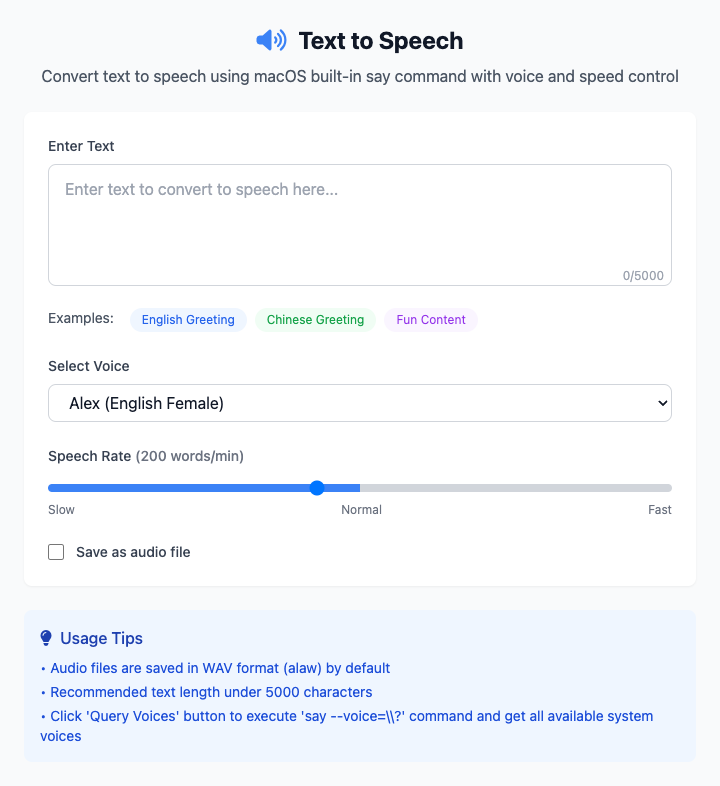
- Input Text: Enter "Hello, World" in the text box.
- Select Voice: Choose
Ting-Ting(Chinese) from the dropdown list. - Click "Execute" Button: After the command completes, you'll hear your Mac speaking.
- (Optional) Save File: If you need to generate an audio file, check "Save as Audio File" and select a save location.
🤔 When Should I Use It?
- You want to listen to long text content without looking at the screen, such as reading a very long article.
- You're learning a new language and want to hear the standard pronunciation of a word or sentence.
- You want to create temporary voiceover for your video or podcast without recording it yourself.
⚙️ Parameter Settings
Input Text: Text content that needs to be converted to speech. We provide a one-click function to fill in sample text for quick testing.
Select Voice:
- Preset List: Provides some commonly used Chinese and English voices for quick selection.
- Custom Voice: You can manually enter system voice names. Click "Query Available Voices" to list all available voices on your current system in the terminal.
Speech Rate: Controls the reading speed, measured in "words per minute", ranging from 50 to 400.
Save as Audio File:
- Checkbox: Determines whether to read directly through speakers or generate a file.
- Save Location: When save is checked, used to specify the output directory for
.aiffformat audio files.
⚠️ Important Notes
- This command depends on macOS's built-in
saytool, so it's only available on macOS. - The available voice list depends on your macOS version and system settings. You can manage and download more voices in "System Settings" > "Accessibility" > "Spoken Content".
- Saved audio files are in
.aiffformat, which is a high-quality lossless audio format.
Related Tools
In the CmdWise app marketplace, you can also find other voice and audio tools:
- Edge Text-to-Speech: Use Microsoft Edge's online TTS service for richer, more natural voices.
- Sox Audio Converter: Powerful audio format conversion and processing tool with batch operation support.