FFmpeg Video Clipper: Precise Video Segment Editing
Using the ffmpeg engine, precisely extract any segment you need from a long video and save it as a new video file. Supports single file processing as well as batch clipping of videos in entire folders.
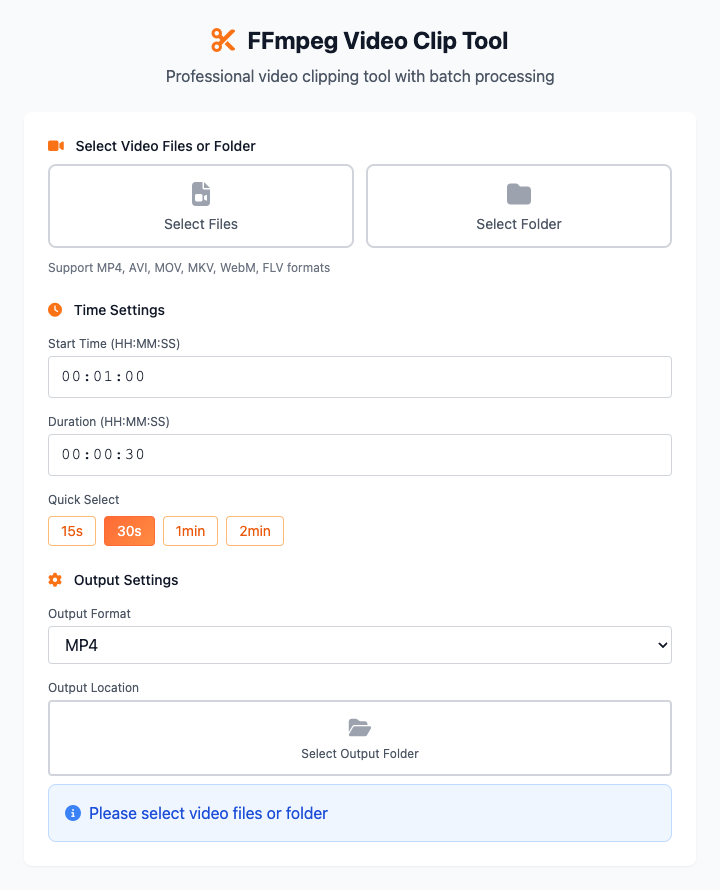
⚡️ Quick Start: Extract a 30-Second Segment
- Click Select File or Select Folder to import your video.
- In "Time Settings", enter the start time (for example,
00:01:00means starting from the 1-minute mark). - Enter or select the clip duration (for example, click the "30 seconds" preset button).
- Select an output location.
- Click the "Execute" button. After the command completes, you'll get a clipped video file.
🤔 When Should I Use It?
- You want to extract the most exciting segment from a movie to share with friends.
- You recorded an hour-long meeting but only want to keep the key 5 minutes.
- You want to create a looping short video and need to precisely control start and end times.
- You have a large amount of video material and need to perform uniform duration batch trimming.
⚙️ Parameter Description
Input Method
You can choose two ways to import videos:
- Select File: Select one or more video files at once for processing.
- Select Folder: Select a folder, and the tool will apply the same clipping settings to all video files in that folder. This is very efficient for batch processing.
Time Settings
This is the core of the clipping function, where you need to specify two values:
- Start Time: The time point from which you want to start clipping from the video. Format is
hours:minutes:seconds(HH:MM:SS). - Clip Duration: Starting from the start time, how long you want the clipped segment to be. Also uses
hours:minutes:seconds(HH:MM:SS) format. We also provide quick selection buttons for common durations.
Output Settings
- Output Format: You can specify a new format for the clipped video segments, supporting
mp4,avi,mov,mkv. - Output Location: Choose a folder to save all the new clipped videos.
⚠️ Dependency Installation
Before using this tool, you need to install FFmpeg on your Mac. If you have Homebrew installed, just run this once in the terminal:
bash
brew install ffmpegRelated Tools
In the CmdWise app market, you can also find other video processing tools:
- FFmpeg Video Converter: Convert various video formats to MP4
- FFmpeg GIF Maker: Convert video segments to GIF animations
- FFmpeg Audio Extractor: Extract audio tracks from videos